
ArmorPaint 1.0 is out after eight years in early access
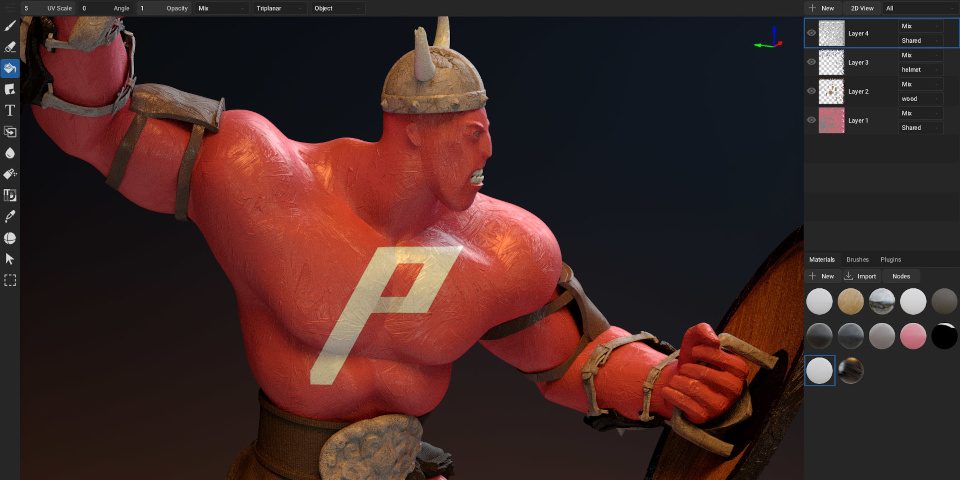
The Armory development team has released ArmorPaint 1.0, the long-awaited ‘official’ version of the open-source 3D texture painting software, after eight years in early access.
The update rewrites the software in C, improving performance, and making it possible to paint interactively on much larger 3D assets, with more, higher-resolution texture layers.
There are also now basic sculpting and UV editing systems, timeline playback for skinned characters, plus AI-based image upscaling and photo-to-material generation.
The 1.0 release is now available to download for Windows, Linux and macOS, and as experimental Android and iOS editions.
(Editor’s note: at the time of writing, the stable release doesn’t seem to have been announced on the product website, but the downloads are no longer listed as early release candidates.)
A standalone 3D painting tool for game development, motion graphics and VFX
First released in early access in 2018, ArmorPaint is a 3D painting tool capable of generating PBR texture maps for use in DCC software or game engines.
Often seen as a lower-cost alternative to Adobe’s Substance 3D Painter, it enables artists to texture models by painting directly on their surface in a real-time, path-traced 3D viewport.
The software is GPU-based, offering “seamless” 16K painting on a high-end GPU.
Users can import 3D assets in standard formats, or as Blender scene files, then create base materials using ArmorPaint’s node-based material editor, or by importing existing sets of PBR texture maps, which the software will assemble into a material.
Painting tools include the base paintbrush; an eraser; a decal tool; fill, clone and blur tools.
It is also possible to bake a range of geometry-based texture maps, including AO, Cavity, Thickness and normal maps; plus material ID maps and lightmaps.
Texture maps can be exported in PNG, JPEG or EXR format at up to 32-bit color depth, and the software also has live link plugins for Blender, Unity and Unreal Engine.
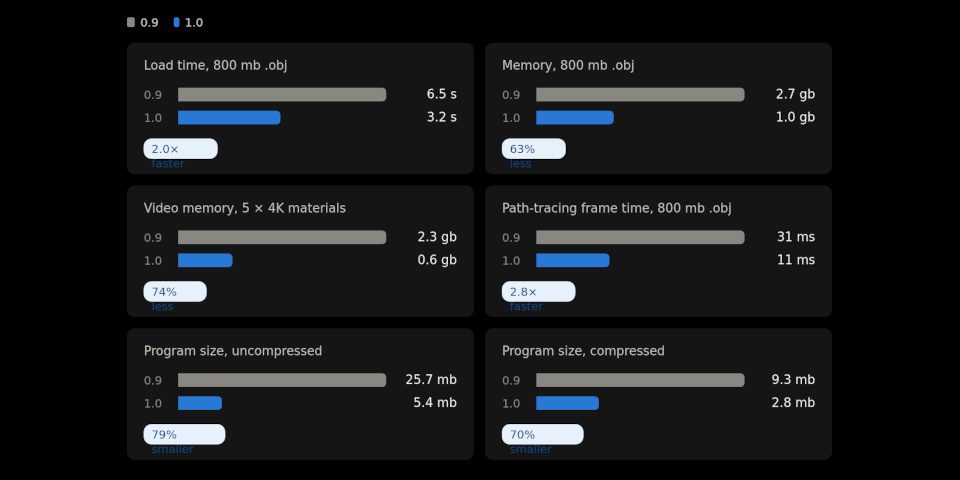
ArmorPaint 1.0 (blue bars) improves performance over version 0.9 (gray bars).
ArmorPaint 1.0: now out of early access, and rewritten in C for performance
The first ‘official’ production-ready release of the software, ArmorPaint 1.0 completely rewrites the software under the hood.
Originally written using Haxe and powered by JavaScript engine V8, it is now fully written in C, and requires no external libraries.
GPU acceleration is now done using Direct3D 12, Vulkan, Metal and WebGPU, while ray tracing uses Direct3D 12 on Windows, Vulkan on Linux and Android, and Metal on macOS and iOS.
One consequence is that the code base is now a lot smaller – according to this blog post on the changes, you could now fit ArmorPaint on two old-school 1.4MB floppy discs.
More importantly, it uses a lot less memory, making it possible to load bigger models, paint higher resolution textures, and use more texture layers without upgrading your hardware.
Viewport frame rates are also higher, as you can see from the benchmark image above.
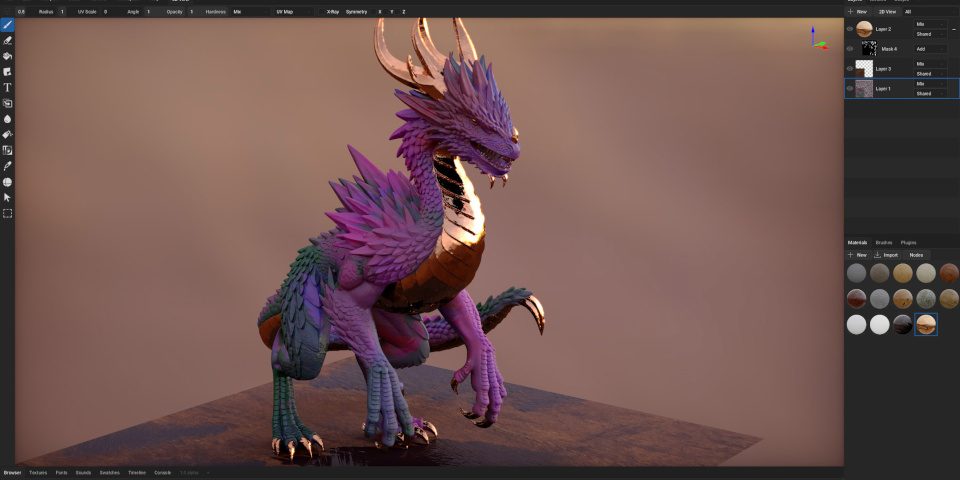
New features: basic sculpting and UV editing, timeline playback, and new AI nodes
In addition, ArmorPaint 1.0 adds some pretty major new features.
That includes a basic digital sculpting mode, new Decimate, Subdivide, Smooth and Bevel modifiers for manipulating imported geometry, and a basic UV editor.
For 3D painting, new path and curve layers can be used to add details like stitching or geometric patterns to models.
A new timeline tab makes it possible to play back animations for skinned meshes, like characters and creatures, or even to create simple tweened mesh and layer animations.
There are also new ‘Neural Nodes’ for performing generative AI operations: from upscaling images and converting images to PBR textures to full text-to-image generation.
You can find a list of AI models currently supported in the online documentation: they’re all open-source, and all run locally on your workstation or tablet.
Games artists get a new ‘make tilesheet’ plugin and associated nodes.
Workflow and pipeline integration improvements
Workflow improvements include node previews and the option to rename and collapse nodes in the material editor, and a minimap and autocomplete system in the script tab.
Changes to file import and export include an uncompressed EXR importer, support for importing JSON materials and LUTs in CUBE format for color grading, and the option to export meshes in GLB format.
At the time of writing, there doesn’t seem to be a changelog for the final release, but you can see a list of other new features in the changelog for the final release candidate.
Price and system requirements
ArmorPaint 1.0 is available for Windows 10+, Linux and macOS, and as experimental editions for iPadOS and Android.
Live link plugins are available for Blender, Unity and Unreal Engine, although at the time of writing, none has been updated to a final 1.0 release.
The source code is available free under a zlib licence.
To help support development work, compiled binaries are available commercially online, and cost $19 on itch.io. The iOS app costs $17.99 and the Android app costs $19.99.
Read a full list of new features in ArmorPaint 1.0 in the online changelog
Read an overview of ArmorPaint in the software’s online manual
Have your say on this story by following CG Channel on Facebook, Instagram and X (formerly Twitter). As well as being able to comment on stories, followers of our social media accounts can see videos we don’t post on the site itself, including making-ofs for the latest VFX movies, animations, games cinematics and motion graphics projects.