
New CG software you may have missed: 18 October 2026
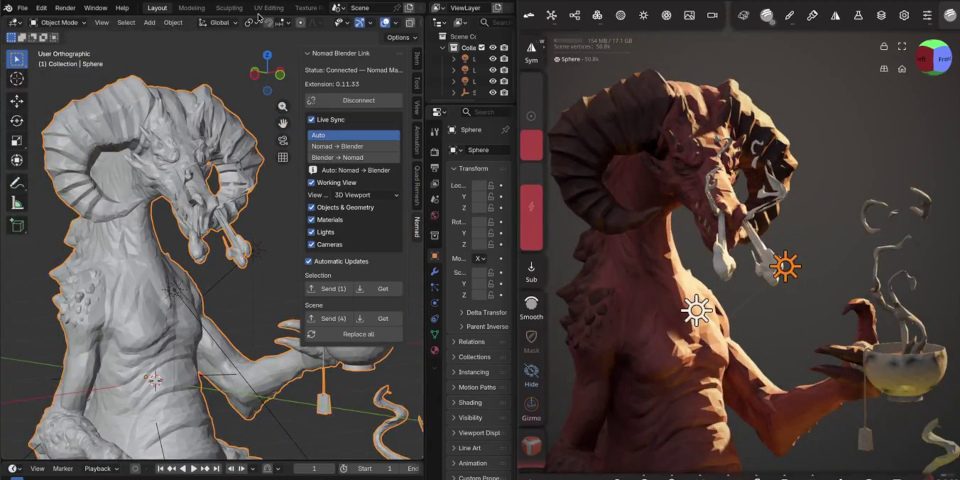
Live sync between Nomad Sculpt and Blender: one of the new features in the recent updates to the popular digital sculpting app for Android tablets, iPad and desktop workstations.
While CG Channel tries to write about the major new versions of CG software released each week, sometimes there are smaller updates or useful plugins that we don’t manage to cover.
Rather then letting those releases slip past unnoticed, we’ve put together a round-up of updates to VFX, animation and motion graphics tools that didn’t get full stories last week.
It’s a bumper haul, covering Autograph 2027.0 and Red Giant 2027.0, the latest major versions of Maxon’s free motion graphics software, and its commercial motion graphics and VFX plugins.
There are also new versions of IlluGen and LiquiGen, JangaFX’s real-time visual effects and liquid simulation tools, and FumeFX for Maya, Sitni Sati’s offline smoke and fire simulation plugin.
2D animators get a major free update to Moho, digital sculptors get new versions of Nomad Sculpt and ByHand, and digital painters get Chroma Space, a new Photoshop 3D color picker.
In addition, NVIDIA’s AI-based video upscaling, frame generation and SDR to HDR conversion tech is now available as custom nodes in ComfyUI, running locally on an artist’s machine.
And finally, development of Atlux for Unreal Engine, a well-regarded visualization add-on that recreated a real-world photo studio inside the game engine, has been discontinued.
Autograph 2027.0
Overview
USD-based motion graphics, VFX and compositing software Autograph gets its biggest update since new owner Maxon made it available for free earlier this year.
New features
- MCP Server: connect Autograph to external AI tools like Claude or ChatGPT
- New distribution and orientation modes for the Tile modifier
- Improved vertical text and Japanese typography
- Text is preserved when switching between Plain Text and Rich Text modes
- Copy and paste cameras, lights, nulls and primitives from Cinema 4D 2027.0
- Supports the Adobe Fonts library
- Maxon Studio is now a native dockable panel, not a floating window
Price and system requirements
Autograph 2027.0 is compatible with Windows 10+, and macOS 15.0+.
Read a full list of new features in Autograph 2027.0 in the online release notes
ByHand 0.2.2
Overview
ByHand, Truong CG Artist’s free digital sculpting application has been updated steadily since its original release earlier this year.
There are a range of new sculpting brushes, including Bulge, Chisel, Hook and Layer – and, as of ByHand 0.2.2, the most recent release – Tube and Insert Mesh brushes.
Other key changes include a new Collaboration system, which makes it possible to invite friends to a scene and sculpt alongside them in real time.
New features
- New Bulge, Chisel, Hook, Insert Mesh, Layer and Tube brushes for sculpting
- Collaboration system: invite friends to a scene, and sculpt alongside them
- Timelapse recording of sculpting sessions
- Turntable rendering
Price and system requirements
No changes since our story on the original release.
Read a full list of new features in ByHand on the software’s Discord server
Chroma Space for Photoshop
Overview
Colgart – aka former Blizzard, Meta and Netflix Senior Concept Artist Corey Loving – has released Color Space, a neat new color picker plugin for Photoshop.
Unlike conventional pickers, it doesn’t display colors as 2D swatches, but on a 3D model under customizable lighting conditions, making it possible to pick more accurately.
Features
- Display colors on a 3D model inside Photoshop
- Choice of base 3D models: sphere, cube, human head, mountain
- Lighting controls: includes highlight, core shadow, and bounce light
- Time-of-day slider recreates real-world lighting conditions
- Customizable background: set sky, horizon and ground color independently
- Supports HSB, RGB, LAB and CMYK color spaces
Price and system requirements
Color Space is compatible with Photoshop 25.12+ on Windows only. macOS support is in beta.
The Basic version costs $39; the Pro version, which includes more base 3D models and time-of-day-presets, costs $49. Studio licenses cost $349.
Read more about Color Space for Photoshop on the product website
ComfyUI October updates
Overview
ComfyUI, the AI orchestration platform focused on VFX, animation and motion graphics work, is updated frequently, but this week’s changes are significant for NVIDIA users.
NVIDIA’s RTX video effects – including video upscaling, frame generation and SDR-to-HDR conversion – now run inside ComfyUI as custom nodes, and can be run locally on a user’s GPU.
Other recent changes include support for 16-bit as well as 32-bit EXR files, and support for the Krea 3, FLUX 3 Image Klein and Nano Banana 2.1 AI models.
New features
- RTX Video Super Resolution node: upscales video by up to 4x, or up to 8,192px
- RTX Video Frame Generation node: increases frame rates 2-16x by AI frame generation
- RTX Video HDR node node: converts SDR to BT.2020 HDR data, with HLG or PQ output
Price and system requirements
Comfy Desktop is compatible with Windows, Linux and macOS. It’s free. The source code is available under an open-source GPLv3 license.
The custom RTX nodes require a NVIDIA RTX GPU (a RTX 40 Series GPU or better for RTX Video Frame Generation). The source code is available under an Apache 2.0 license.
Running AI models in the cloud via ComfyUI requires a paid subscription. Subscriptions start at $192/year. Usage is credit-based.
Read more about the new custom NVIDIA RTX nodes on the Comfy blog
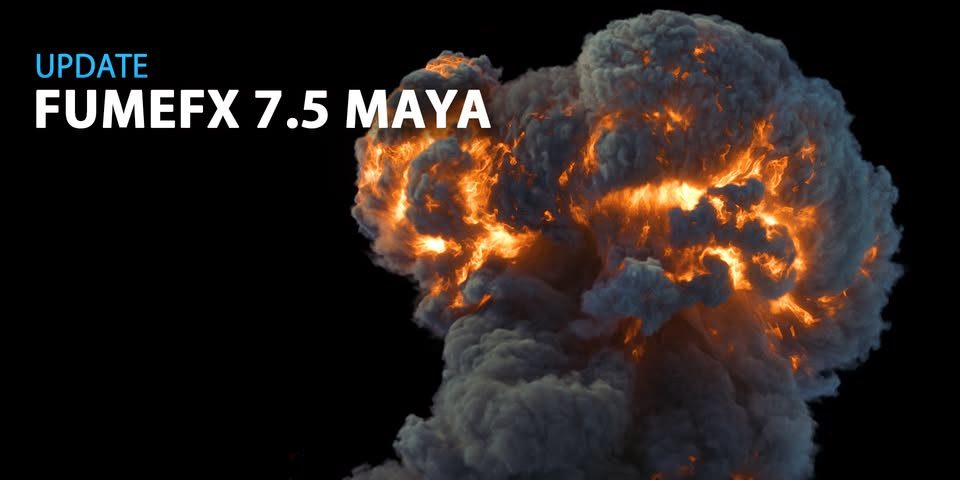
FumeFX 7.5 for Maya
Overview
The gaseous fluid simulation plugin for Maya gets a CPU/GPU Multigrid PCG pressure solver, speeding up smoke and fire sims, and new tools for editing caches without re-simulating.
New features
- Multigrid PCG solver (CPU and GPU): ‘up to 2x’ the GPU simulation speed compared to PCG
- Legacy CG solver now removed
- New post-load Retimer and Fast Upres algorithms retime and add detail to cached simulations without resimulating
- Improved OpenVDB workflow: includes new Y-up option when importing .vdb caches from other applications
Price and system requirements
No changes since our story on the FumeFX 7.0 for Maya.
Read a full list of new features in FumeFX 7.5 for Maya in the online release notes
IlluGen 2.0
Overview
IlluGen, JangaFX’s new software creating 2D and 3D visual effects assets for games, gets its biggest update since the original release.
The update adds new options for creating 3D particle systems, initial support for destruction effects, and new ways to export data to Unreal Engine.
New features
- New GPU particle system built around a single Particle: System node
- Separate modules control particle spawning, properties, interactions and forces
- Particles can be sourced from atlases of 2D sprites or 3D meshes
- Particles can be rendered to textures as camera-projected sprites
- Pivot animation toolset to drive mesh pieces with particles
- Export particle data as Houdini (.hjson/.hbjson) point caches for use in Unreal Engine
- Export particle velocity in .fga format
- Geo: Ribbon node: builds polygon strips along particle trails
- Geo: Fracture node: breaks geometry into Voronoi pieces
- Geo: Boolean node: performs Boolean operations on meshes
- Geo: Revolve node: revolves a profile curve around a chosen axis
- Geo: Extrude node: gives geometry thickness along the vertex or surface normals
- UV Injector node: injects directional, rotational and radial forces into a UV Flow node
- Export 3D meshes as a geometry atlas
- Bake pivot animation into PAT textures for use in game engines
- Workflow improvement include thumbnail previews for geometry nodes
Price and system requirements
IlluGen 2.0 is compatible with Windows 10+, RHEL 9+ Linux, and macOS 15.0+.
Indie subscriptions, for artists earning under $1 million/year, cost $20/month, with users getting a perpetual licence after 18 months. Indie perpetual licences cost $300.
For studios with revenue up to $100 million/year, perpetual node-locked licences cost $1,600, up $200 since the release of IlluGen 1.0; floating licences cost $2,667, up $337.
Read a full list of new features in IlluGen 2.0 on the JangaFX Discord server
LiquiGen 1.2
Overview
JangaFX’s other major new tool, real-time liquid simulation software LiquiGen, gets its second major update since becoming production-ready last year.
New features
- Now available for macOS as well as Windows and Linux
- Support for holdouts in rasterized rendering mode
- New camera navigation controls
- New Godot control template
System requirements
LiquiGen 1.2 is compatible with Windows 10+, RHEL 9+ Linux and macOS 15.0.
Price
No changes since our story on LiquiGen 1.1.
Read a full list of new features in LiquiGen 1.2 on the JangaFX Discord server
Moho 14.5
Overview
Moho, Lost Marble’s popular 2D animation software, gets its “biggest point update ever”, available free to Moho 14.x users.
The biggest change is a new Live mode, making it possible to puppet characters in real time, using a webcam and game controller, with the option to stream the output live.
New features
- Live mode: control characters in real time using a webcam and game controller
- Moho Virtual Webcam: bring character animation into streaming software like OBS Studio
- Fully redesigned Paint Bucket tool with separate Vector, Trace and Recolor modes
- Updates to the Blob Brush and the Freehand, Magnet and Select Points tools
- Magnetic onion skins: new onion skinning type, adjusted automatically based on neighboring keyframes
- Workflow updates to onion skinning, including support for custom color and opacity
- Improvements to layer selection, video tracking, and batch export
- Import and export EXR images and PNG sequences with different color profiles
- New default MP4/H.264 export format tailored to social media
Price and system requirements
Moho 14.5 is compatible with Windows 10+ and macOS 10.15+. The Debut edition costs $59.99; the Pro edition, which adds HD+ export and advanced features, costs $399.99.
Read a full list of new features in Moho 14.5 on Lost Marble’s website
Nomad Sculpt 2.9 to 2.12
Overview
Hexanomad – aka developer Stéphane Ginier – has released several updates to Nomad Sculpt, the digital sculpting app for iPads, Android tablets and desktop systems, in quick succession.
Nomad Sculpt 2.9, a major update, available in early access since late last year, officially shipped earlier this month, and was followed within days by versions 2.10, 2.11 and 2.12.
New features
- 2.9: New VDM brushes create vector displacement maps from sculpts
- 2.9: New Elastic and Polish brushes
- 2.9: New Arrange system spreads objects along a line, circle or sphere
- 2.9: New Text primitive with Google Font support
- 2.9: New Autoremesher for automatic retopology
- 2.9: New UV unwrap system
- 2.9: Supports 25 layer blending modes for texture painting
- 2.9: Updates to sculpting, selection, masking, topology and mesh decimation workflow
- 2.9: Live sync to Blender, ZBrush and other instances of Nomad Sculpt
- 2.10: Paint with shapes: line, band, lasso, polygon, rectangle, ellipse
- 2.10: Band: creates gradients between two guides, shaped by a curve
- 2.10: Support for displacement maps
- 2.10: Displacement maps can be imported and exported in OBJ, FBX and USD files
- 2.10: Updates to the Tube IK and Spiral primitives, Surface repeater, and snapping
- 2.11: Smooth base: measure the displacement from the subdivided base, for Blender adaptive subdivision
- 2.12: Add a plane to sculpt a VDM, or capture one from the surface
- 2.12: Option to align the pivot to the currentview
Price and system requirements
Nomad Sculpt is compatible with Android 8.0+, iOS 16.0+ and iPadOS 16.0+. It costs $19.99.
The desktop edition is compatible with Windows and macOS, and can be used on two machines. It costs $35.
Read a full list of new features in Nomad in the online changelog
Red Giant 2027.0 and Universe 2027.0
Overview
Red Giant, Maxon’s suite of effects plugins for compositing and editing software, gets a new AI-assisted relighting system, plus workflow improvements
Universe, the online library of effects and transitions included with Red Giant subscriptions, has also been updated, although the new version isn’t officially Universe 2027.0.
New features
- Scene Light: relight shots in After Effects using AI-generated depth and normal maps
- Chromatic Displacement is now supported in Autograph
- New custom schmutz Textures and light sources in Real Lens Flares
- Maxon Noise procedural noise types are now supported in Universe
- Capsules in Maxon Studio can now use controls from Particular, Colorista, and Universe
Price and system requirements
Red Giant is compatible with After Effects 2025+ on Windows 10+ and macOS 15.0+. Some individual tools are compatible with other host applications, including DaVinci Resolve.
Complete Red Giant subscriptions, which include Universe, cost $85/month or $639/year. Individual Universe subscriptions cost $32/month or $214/year.
Read a full list of new features in Red Giant 2027.0 in the online release notes

Atlux for Unreal Engine discontinued
Overview
And finally, a kind of negative update: Jorge Valle Hurtado has announced that he is ending development of Atlux, his plugin that recreates a real-world photo studio inside Unreal Engine.
The add-on – also known as Atlux λ and Atlux One, and originally as MetaShoot – is still being maintained, and is still available to buy, but will no longer get major new features.
Hurtado continues to develop Atlux Go, the browser-based edition of Atlux. It is currently in closed beta.
Price and system requirements
Atlux is compatible with Unreal Engine 5.4+. A perpetual license costs $249.50; rental costs $49.50/month. The add-on is free to students and educators.
Read Jorge Valle Hurtado’s announcement that he is discontinuing Atlux for Unreal Engine
Have your say on this story by following CG Channel on Facebook, Instagram and X (formerly Twitter). As well as being able to comment on stories, followers of our social media accounts can see videos we don’t post on the site itself, including making-ofs for the latest VFX movies, animations, games cinematics and motion graphics projects.