
Rizom-Lab releases Rizom UV 2027.0
Rizom-Lab has released RizomUV 2027.0, the latest version of its UV unwrapping and packing software for game development, VFX and motion graphics.
It’s a significant update, intended to improve usability in professional pipelines, making it easier to customize the software, improving performance with complex production assets, and introducing a new headless mode for batch processing assets.
Games artists get a new map-based workflow for controlling texel density.
Despite the version number, it is actually the first major release since RizomUV 2025, Rizom-Lab having switched to Autodesk-style numbering: there was no RizomUV 2026.
A standalone UV unwrapping tool for entertainment or product design
Available under its current branding since 2018, RizomUV is a standalone tool for UV unwrapping 3D models and packing the resulting UV islands.
It comes in two editions: RizomUV Virtual Spaces (VS) and RizomUV Real Space (RS).
Both have similar features, but whereas VS is designed for games and VFX, RS is designed for product design, and works in unnormalised UV space.
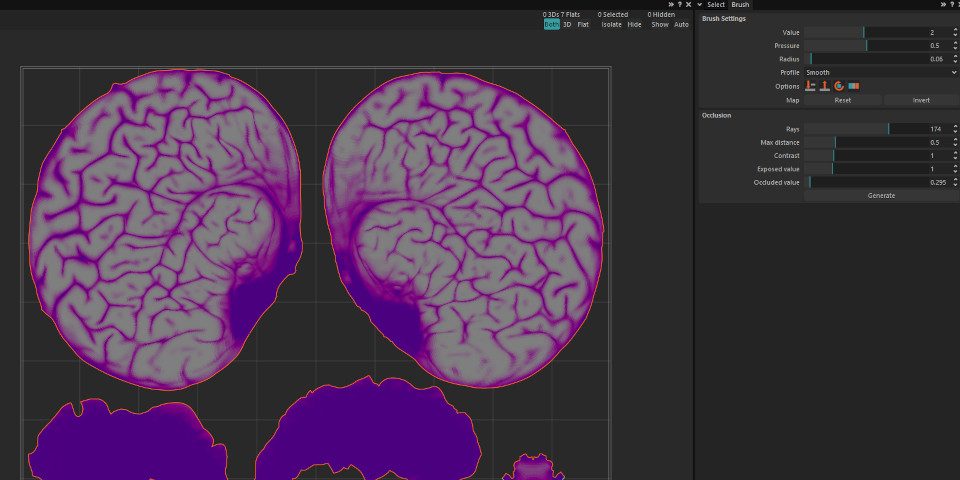
RizomUV 2027.0 can now allocate texel density according to ambient occlusion data.
New features: new map-based workflow for controlling texel density
RizomUV 2027 is a significant update – in fact, Rizom-Lab describes it as the most significant release in the software’s history.
That’s primarily for the changes it makes under the hood – to user customizability, to the processing of complex assets, and to the way it integrates with production pipelines.
However, there are also some interesting new features, so let’s deal with those first.
One is a new map-based workflow for controlling texel density, giving games and real-time artists more control over how an asset’s texture budget is allocated.
Density maps can be generated from ambient occlusion – and so can reduce texel density in recessed areas of a surface – and influence both UV unfolding and packing scale.
The existing edge selection tools have been updated, with edge loops now able to continue through UV seams, and parallel selections able to propagate across cuts.
Other existing tools to get an update include Unfold and Optimize, which can now snap island borders to the U and V axes, automatically straightening irregular borders.
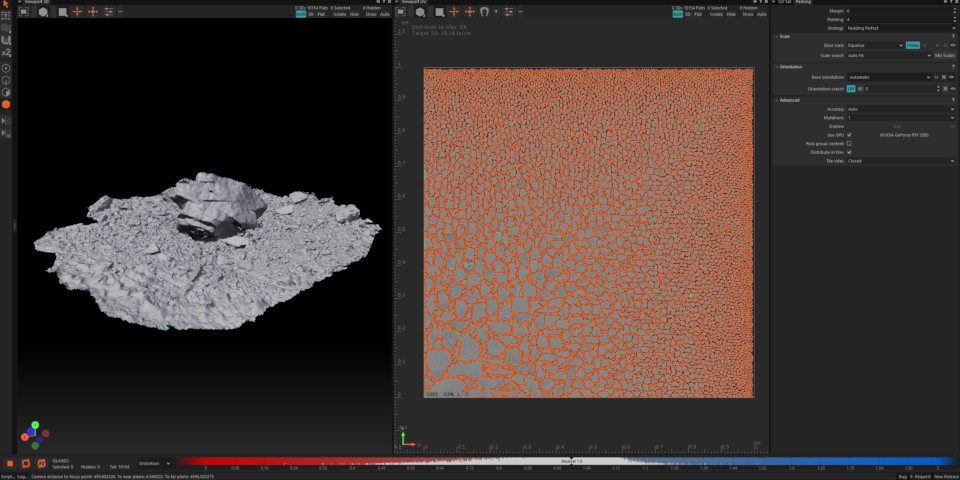
Workflow: create custom workspace layouts and toolbars
However, the changes most significant for day-to-day production work are probably those to workflow, performance, and pipeline integration.
The workspace has been redesigned, making every panel movable, dockable and floatable, making it possible to create custom UI presets for different screen layouts.
It is also now possible to group frequently used tools into custom toolbars, with a new keyboard shortcut making it possible to do a global search for tools and settings.
The viewport has been reworked, partly to make it easier to preview selections and packing states, but also improving UI scaling.
And for working with complex assets, like kitbashed models, the Scene Outliner now supports polygon groups and materials from imported OBJ and FBX files.
Performance: parallel processing of UV islands, and a new Live Update setting
Unfolding performance has been improved, with RizomUV now processing islands in parallel across a scene, automatically allocating the fastest available solver core to each.
A new Live Update setting makes the software display the effect of adding or removing an edge constraint in real time, without the need to apply the change manually.
Pipeline integration: new headless mode, and updates to scripting and file I/O
For pipeline integration, RizomUV 2027 adds a new headless mode, intended for batch processing, automated build steps, and running the software on render farms.
The default scripting language is now Python: on Linux and macOS, Python 3.13, matching the current VFX Reference Platform spec, although it’s Python 3.12 on Windows.
The command log also now records each work session as a script, letting artists capture and reuse workflows in ways that TDs can then convert into more complex tools.
For file import and export, the update adds support for the glTF 2.0 format, and Mac users get USD support – USD support having been added for Windows in RizomUV 2023.0.
It is possible to store more data, including UV constraints and pins, inside FBX files; and large FBX files can be opened selectively, in the same way as USD files.
RizomUVLink, the live connection used by DCC bridges and studio tools, now runs on macOS and Linux as well as Linux.
However, Rizom-Lab doesn’t maintain RizomUV’s integration plugins for DCC apps itself, so whether they are updated will depend on third-party developers.
Price and system requirements
RizomUV 2027.0 VS and RS are compatible with Windows 10+, macOS 11.0+, and Linux (RHEL/Rocky/Alma 8/9 and and Ubuntu 24.04).
There are third-party bridge plugins for a range of DCC applications. The ones for Blender and Maya are fairly up-to-date, but others have now not been updated for years.
Licensing varies between Indie users – artists and companies earning under €100,000/year – and Pro users.
Indie users get the option to rent to own or buy a perpetual licence; Pro users get a rental-only model.
Indie licences of both types are node-locked to two computers, while Pro users can also rent floating licenses.
For RizomUV VS, a perpetual license costs €149.90 (around $168) and rent-to-own costs €14.90/month ($17/month). Pro licenses cost €34.90/month ($39/month).
For RizomUV RS, a perpetual license costs €299.90 (around $336) and rent-to-own costs €29.90/month ($33/month). Pro licenses cost €59.90/month ($67/month).
Read an overview of the new features in RizomUV 2027.0 on Rizom-Lab’s website
Read a full list of new features in RizomUV in the online changelog
Have your say on this story by following CG Channel on Facebook, Instagram and X (formerly Twitter). As well as being able to comment on stories, followers of our social media accounts can see videos we don’t post on the site itself, including making-ofs for the latest VFX movies, animations, games cinematics and motion graphics projects.