
Blackmagic Design releases Fusion Studio 21.1
Blackmagic Design’s NAB 2026 livestream announcing its latest product updates. The new features in Fusion are shown at 1:55:35, shown here in the Fusion page inside DaVinci Resolve.
Originally posted on 14 May 2026. Scroll down for details of the Fusion Studio 21.1 update.
Blackmagic Design has released Fusion Studio 21.0, the latest version of its 3D compositing software for VFX and motion graphics work.
The release adds new tools for motion graphics, updates the deep compositing and USD toolsets, plus checkerboard lens calibration, and Cryptomatte support in the 3D renderer.
Also available inside DaVinci Resolve 21
A version of the Fusion toolset is included in DaVinci Resolve, Blackmagic Design’s colour grading, editing and visual effects software, version 21.0 of which has also just been released.
DaVinci Resolve gets more promotional support than Fusion Studio – at the time of writing, the Fusion Studio 21 product webpage still lists features from version 17 – so the video above shows the Fusion page within DaVinci Resolve 21.0, but the new features should be the same.

Fusion Studio 21.0: new features for motion graphics artists
Fusion Studio 21.0 introduces a lot of new features for motion graphics artists, the biggest one being the integration of Krokodove.
Previously a free third-party add-on, it provides over 70 tools for motion design, from standard image filters to warping and morphing effects, and a range of titling and text animation tools.
In addition, Fusion Studio now supports two common 2D motion graphics formats: the JSON-based Lottie animation format, and the HMTL-based OGraf graphics format.
For creating on-screen text, Fusion’s Text+ and MultiText tools now support colored fonts and emojis, and get a built-in spell checker and auto-correct system.
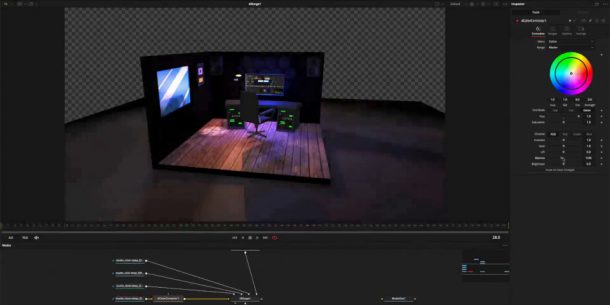
Deep compositing: native color correction on deep images
Fusion Studio 21.0 also extends some of the major toolsets introduced in recent releases, including the new deep compositing toolset added in Fusion Studio 20.0.
The key change is a new dColorCorrector node, which makes it possible to color correct footage natively in deep mode, without having to convert them to a flat image first.
The toolset also now has “full layer support”.
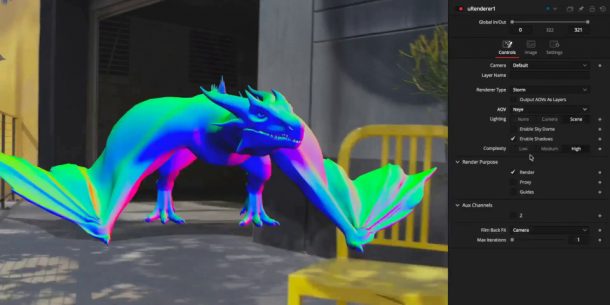
USD workflows: new decal projection and texture reprojection tools
The USD toolset added in Fusion Studio 18.5 gets two new nodes, uProjector and uCatcher, for decal projection and texture reprojection.
A new Is Matte checkbox makes it possible to designate an object to be rendered as a holdout matte to occlude other objects in a scene.
The USD renderer gets a new AOV option, Neye, for rendering camera-relative normals, for relighting scenes.
In addition, Fusion Studio becomes the latest VFX application to support Hydra 2, the latest version of the USD rendering framework, also supported in Houdini and Katana.
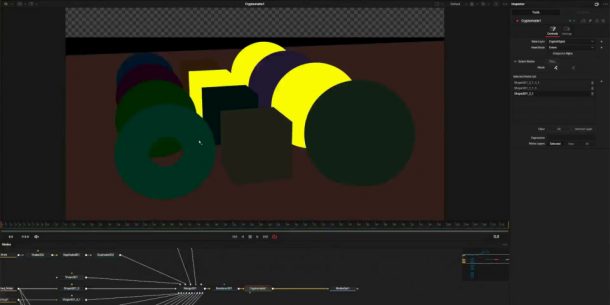
Cryptomatte support, relief map generation and lens correction
Outside the USD toolset, Fusion Studio’s standard 3D renderer can now export Cryptomatte data, the ID matte-generation system now supported in most DCC applications and renderers.
There are also new tools – Relief Map and Create Relief Map – for creating relief maps, described as “detailed textures that self-occlude and do not require subdividing geometry”.
The Lens Distort node, for handling distortion caused by real-world camera lenses, now supports checkerboard calibration, making it possible to obtain a lens solve from a single frame showing a checkerboard grid.
There are also updates to stereo and immersive workflows, shown in the video at the top of the story.
Workflow: new Macro Editor and MultiInspector
Workflow improvements include a dedicated new Macro Editor for creating templates and macros, and support for user-defined metadata in paths, expressions and scripts.
A new MultiInspector button makes it possible to edit properties shared between nodes.
It is also possible to change properties across all layers within multi-layer nodes like MultiPoly and MultiMerge.
Performance improvements, particularly to SpeedWarp
SpeedWarp, Fusion Studio’s AI-based retiming tool, now uses the same retiming engine as the Edit and Cut pages in DaVinci Resolve, improving performance.
The Relight and Depth Map tools are now “up to 6x” faster.
Native support for Windows on ARM
Fusion Studio also becomes the latest CG application to get native support for Windows on ARM, improving performance on many current Copilot+ laptops and tablets.
DaVinci Resolve has supported Windows on ARM since 2024.
Blackmagic Design’s launch video for DaVinci Resolve 21.1. The new features on the Fusion page (shown at 07:35 in the video) are the same as those in Fusion Studio 21.1 itself.
Updated 9 September 2026: Blackmagic Design has now released Fusion Studio 21.1, a free update to the software that adds further new features for both motion graphics and VFX artists.
Motion graphics: new Krokodove tools, and updates to OGraf and MultiText
For motion graphics, the new integrated version of the Krokodove library gets over 25 new tools, primarily for creating 2D shapes and 3D forms.
For 2D work, that means a new sPrimitive Create node for creating more complex primitive shapes like crosses and stars, and a set of “advanced edge manipulation tools”.
For 3D work, new nodes include Connect3D, for connecting vertices with networks of lines; HeightFieldCreate3D, for using bitmap images to deform 3D planes; and TubeCreate3D, for creating networks of tubular forms.
There are also new utility tools for defining and isolating regions of a 3D environment.
In addition, Fusion Studio 21.1 supports time-based animation actions in imported OGraf assets, with the asset loader getting frame, ease and scale controls.
The MultiText tool gets new options for aligning text layers.
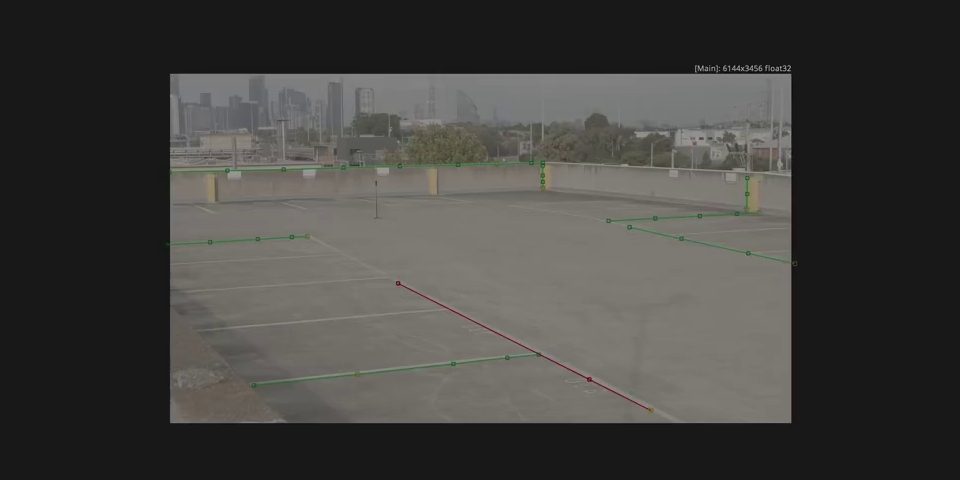
VFX: updates to lens calibration, deep compositing and camera tracking
VFX artists get a new calibration mode in the Lens Distort tool, Fusion Division Radial, which makes it possible to calibrate by drawing lines along straight edges of objects in a frame.
The Camera Tracker gets the option to import tracks generated in other software, and new controls for trimming tracks, and changing the reference frame.
There are also several updates to the deep compositing toolset, including support for flipbook previews of deep images, and a new Hard Mix blend mode.
The Renderer3D renderer gets support for motion blur and matte objects when running in deep mode, and “up to 8x faster” hardware-accelerated deep renders.
Workflow improvements and pipeline integration changes
Fusion Studio’s Macro Editor gets several workflow improvements, including improved batch selection, and support for multi-template DRFX files.
For pipeline integration, the software now supports OCIO 2.5, the latest version of the color management standard, including ACES 2.0 workflows.
The update also adds support for a new VFX industry standard: OpenPBR material shaders.
It is also now possible to import and export EXR files with HTJ2K compression.
Support for Python 2.0 – which reached its official end of life in 2020, and has now been deprecated in most other VFX software – has been ended.
Price and system requirements
Fusion Studio 21.1 is compatible with Windows 10+, Rocky Linux 8.6+ and macOS 15.0+. The update is free to existing users. New perpetual licenses cost $295.
The Fusion toolset is also available in the free edition of DaVinci Resolve, with a maximum image resolution of 16k x 16k and no network rendering capabilities. See a feature comparison.
Read a full list of new features in Fusion Studio 21.0 and Fusion Studio 21.1
Have your say on this story by following CG Channel on Facebook, Instagram and X (formerly Twitter). As well as being able to comment on stories, followers of our social media accounts can see videos we don’t post on the site itself, including making-ofs for the latest VFX movies, animations, games cinematics and motion graphics projects.