
Maya 2027 is out: discover its new features
Autodesk has released Maya 2027, the next major version of its 3D modeling and animation software for visual effects, games and motion graphics work.
The update adds features throughout Maya’s key toolsets, including 3D modeling, look development, character rigging, animation, simulation and rendering.
Highlights include the new Smart Bevel system, the integration of skinning add-on ngSkinTools, and support for surface tension in Bifrost liquid simulations.
There are also new AI-based features, including an experimental AI assistant, and support for animating horses with generative AI animation system MotionMaker.
Autodesk has also released Maya Creative 2027, the corresponding update to the cut-down edition of Maya for smaller studios.
3D modeling: Smart Bevel produces clean bevels on messy topology
Changes to Maya’s core toolsets include new bevel-generation system Smart Bevel.
Unlike Maya’s existing Bevel command, it follows the shape of the mesh rather than its underlying topology, producing better results on meshes with uneven edge spacing.
It should also work better on meshes created by Boolean modeling operations: you can see side-by-side comparisons with the traditional tools in the online documentation.
Character rigging: Skinning add-on ngSkinTools now integrated into Maya
Character artists get an integrated version of ngSkinTools, Viktoras Makauskas’s third-party skinning plugin, which Autodesk recently acquired.
It introduces a new non-destructive, layer-based approach to skinning, plus new options for masking and mirroring when painting skin weights onto a character.
According to Autodesk, the new workflow makes it possible to iterate more quickly on character rigs, and improves the quality of the results when working with complex deformations.
Animation: Workflow improvements to the Sequencer
Animators get quite a few workflow improvements to the Sequencer, Maya’s environment for editing camera shots for review.
Changes include the option to trim or time-scale a shot by dragging its edge, and a new dedicated Playblast menu for Playblasting or regenerating selected shots.
There are also new ways to organize shots visually, including options to color-code them, assign labels to them, or create custom thumbmails for them.
Animation: Generative AI animation system MotionMaker now works for horses
The update also extends MotionMaker, the generative animation system introduced in Maya 2026.1, and targeted at creating quick animations for layout and previs work.
In the initial release, it worked for humans and wolf-like dogs, to which Maya 2027 adds support for horses, with a new readymade 3D character and AI model trained on real-world mocap data.
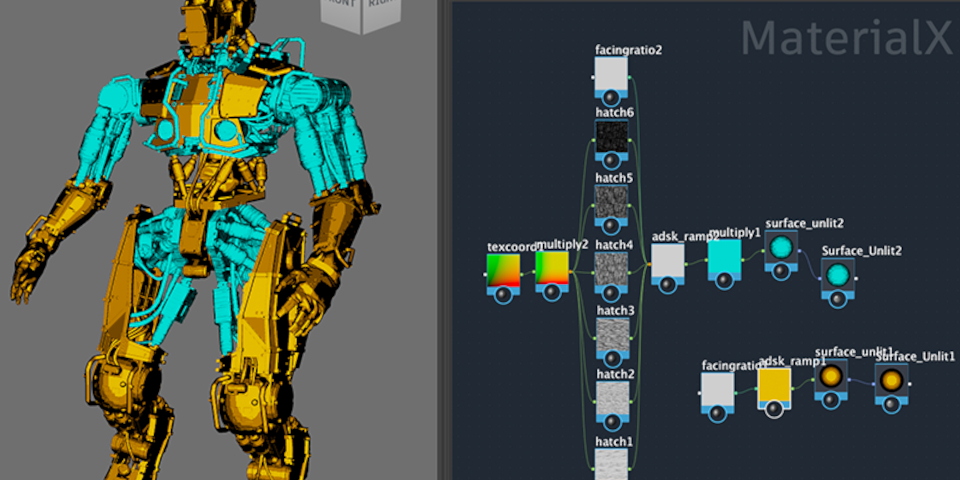
LookdevX 2.0: Support for relative paths in MaterialX documents
The plugins bundled with Maya have also been updated, including LookdevX, Maya’s material authoring and look development environment.
In LookdevX 2.0, the UV Editor texture menu displays all nodes with UV coordinate inputs, including ramp, checkerboard and noise nodes, rather than just shader and image nodes.
In addition, MaterialX documents can now use relative as well as absolute file paths, and the Archive Scene feature works with scenes containing MaterialX documents.

Bifrost 3.0: New options for liquid and rigid body simulation
Bifrost for Maya, Maya’s node-based framework for building effects, has also been updated.
Bifrost 3.0 adds new options for small-scale liquid simulations, including surface tension settings for creating close-up droplets and splashes.
It is also now possible to use ocean surface simulations as guides for liquid simulations.
Rigid body simulations get a new construct_constraint node, which can be used to set up a range of common constraint types, including hinge, slider, cone twist and spring constraints.
The slowly evolving procedural rigging tools get a new eye module for eyelid deformation, and a rod solver for secondary motion on chain- and tree-like structures.
In addition, Bifrost now supports asynchronous evaluation, making it possible to continue to work in the Bifrost Editor while a graph is compiled, rather than having the interface lock up.
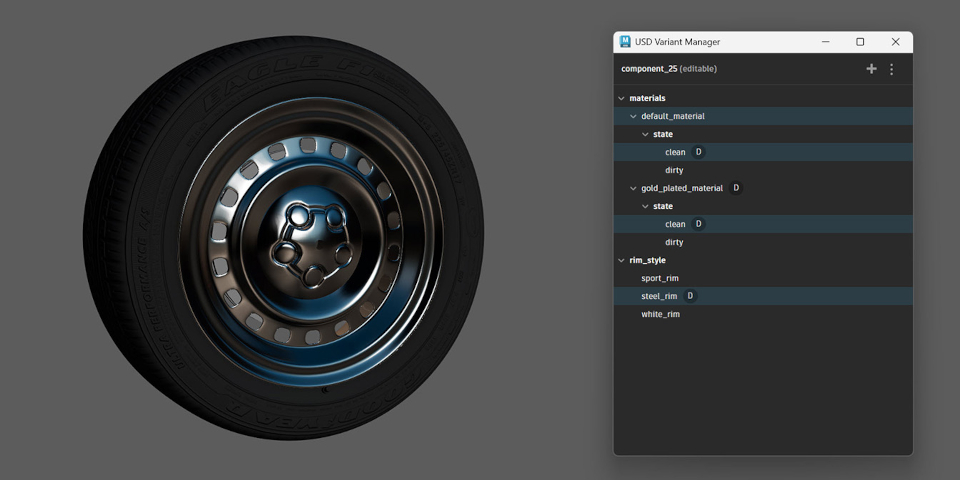
USD for Maya: new dedicated Component Creator and Variant Manager
USD for Maya, Maya’s Universal Scene Description plugin, gets new tools for creating USD assets directly within Maya, using objects from a Maya scene.
The Component Creator converts selected objects into a structured USD stage.
The Variant Manager provides a dedicated environment for viewing variant sets, making it possible to add, remove, edit or switch between variant sets from a single interface.
USD for Maya 0.35 also includes fixes to USD import and export.
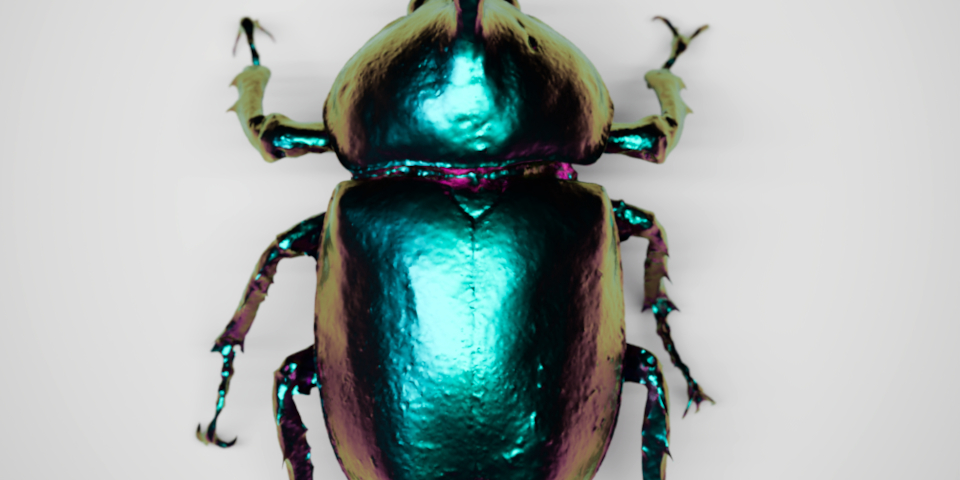
Arnold for Maya: better volume and hair rendering, and new shaders for stylized effects
Maya’s integration plugin for Autodesk’s Arnold renderer has also been updated, with MtoA 5.6.0 introducing support for the Arnold 7.5.0.0 core.
In itself, it’s a small update, but quite a few other features have been added to Arnold since the release of Maya 2026.2, including the new Nearest Points Shader and Line Shader for stylized and motion graphics looks, and updates to volume rendering, hair shading and thin film effects.
You can read about them in more detail in our stories on Arnold 7.4.4 and Arnold 7.4.5.
Autodesk Assistant: Experimental internal chatbot answers your technical questions
Last year, Autodesk unveiled Autodesk Assistant, an upcoming “agentic AI partner” for controlling its software using natural-language commands.
Maya 2027 includes an early technical preview of it, albeit in a much more limited form.
While the ultimate aim is to let users control Maya using natural-language commands, in the initial release, it’s a technical help system – essentially, an integrated chatbot – searching Autodesk documentation to give answers to questions like ‘How do I edit keyframes?’.

Flow Studio: Launch Flow Studio from inside Maya
Other changes in Maya 2027 include a new button in the Status Line to access Flow Studio, Autodesk’s cloud-based platform for VFX and animation work.
Flow Studio itself can be used for a range of tasks, including AI motion capture, but the button literally only launches it: we checked with Autodesk, and there is no deeper integration.
Maya Creative 2027 also released
Autodesk has also released Maya Creative 2027, the corresponding update to the cut-down edition of Maya aimed at smaller studios, and available on a pay-as-you-go basis.
It has the same new features as Maya 2027, with the exception of Bifrost 3.0.
Price and system requirements
Maya 2027.0 is available for Windows 11, RHEL and Rocky Linux 8.10/9.7, and macOS 14.0+.
The software is rental-only. Subscriptions cost $255/month or $2,010/year.
In many countries, artists earning under $100,000/year and working on projects valued at under $100,000/year, qualify for Maya Indie subscriptions, now priced at $330/year.
Maya Creative is available pay-as-you-go, with prices starting at $3/day, and a minimum spend of $300/year.
Read a full list of new features in Maya 2027 in the online documentation
Have your say on this story by following CG Channel on Facebook, Instagram and X (formerly Twitter). As well as being able to comment on stories, followers of our social media accounts can see videos we don’t post on the site itself, including making-ofs for the latest VFX movies, animations, games cinematics and motion graphics projects.