
Canva releases Affinity 3.2
Canva has released Affinity 3.2, the latest version of its new free application that combines the functionality of Affinity Photo, Affinity Designer and Affinity Publisher into a single product.
The release adds a Texture Filter for enhancing midtone details in images, new Vector Blob and Vector Erase brushes for vector design, and updates the RAW image processing toolset.
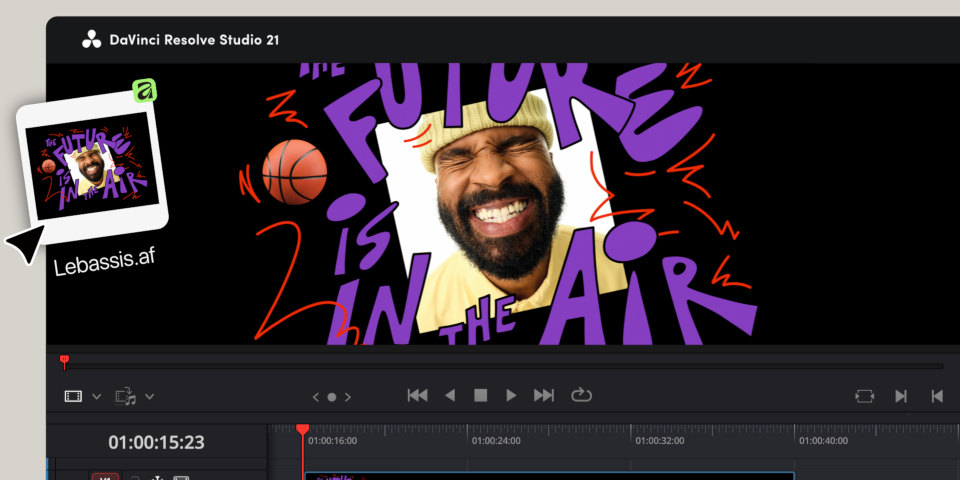
It is also now possible to import Affinity files into DaVinci Resolve to use as title cards and annotations, with changes transferred from Affinity to Resolve in real time.
A new free application that unifies the old Affinity tools
Launched last year, the free Affinity software combines the functionality of the old Affinity tools – Affinity Photo for image editing, Affinity Designer for vector design and Affinity Publisher for page layout – into a single, unified application, dividing it up into separate ‘Studios’ within the interface.
Although you need a paid subscription to use Canva’s online AI tools, which can be accessed within the software, all of that core functionality is free.
Canva describes it as “the full professional-grade Affinity experience” with “no catch, no stripped-back version, and no gotchas”.
Export Affinity documents to DaVinci Resolve to use as titles and overlays
For CG Channel readers, arguably the most significant change in Affinity 3.2 is not to Affinity itself, but to DaVinci Resolve, Blackmagic Design’s free video editing and color grading software.
DaVinci Resolve 21.0 – currently in beta – adds support for Affinity’s .af format, making it possible to import Affinity files into the Media Pool, to use as title cards, video overlays or annotations.
The assets update in real time inside Resolve whenever changes are made to them in Affinity.
In addition, photo editing software Capture One can now export .af files, preserving masks, watermarks and metadata when they are imported into Affinity.
New image-sharpening filters and vector brushes
New features in Affinity itself include the Texture filter, for enhancing fine detail within the midtones of an image, and a new Fine Detail sharpening option in the Multi Band Sharpen filter.
There are also updates to the astrophotography toolset and to RAW image processing, including new Object Selection, Luminosity, Hue Range and Compound mask types.
For vector design, new Vector Blob and Vector Erase brushes create filled vector shapes directly, without having to draw then fill an outline.
The page layout tools get the option to use custom images as bullet points, and better OpenType support.
Paid subscriptions: support for Canva Brand Kits and AI automation with Claude
Users with paid Canva subscriptions get the option to access Brand Kits directly inside Affinity.
If you have Claude Desktop, is also now possible to automate repetitive tasks inside Affinity by giving the AI natural-language instructions. The connector functionality is currently free in beta.
Price and system requirements
Affinity is available for Windows and macOS. The core application is free. To download it, you will need to register for a free online account.
To use Canva’s AI tools inside Affinity, you need a paid Canva subscription. Pro subscriptions now cost $144/year and Business subscriptions now cost $250/year, both prices up since March.
Read a full list of new features in Affinity in the online release notes
Download the new Affinity software
(Includes the online FAQs about the new edition)
Have your say on this story by following CG Channel on Facebook, Instagram and X (formerly Twitter). As well as being able to comment on stories, followers of our social media accounts can see videos we don’t post on the site itself, including making-ofs for the latest VFX movies, animations, games cinematics and motion graphics projects.