
Blender 5.2 LTS is here: discover its 5 key features

The splash screen art for Blender 5.2: an image from artist Joanna Kobierska.
The Blender Foundation has released Blender 5.2, the latest version of the open-source 3D software for VFX, animation, game development and visualization.
Although it’s officially a Long-Term Support release, it’s quite a significant update, adding major new toolsets, and making important structural changes under the hood.
Below, we’ve picked out five new features that we think are particularly significant, from cloth and hair physics in Geometry Nodes to the new texture cache system in the Cycles renderer.
At the end of the story, you can find a round-up of the changes to the other core toolsets, including updates to sculpting, animation, and the Compositor, Sequencer and VR system.
Cloth sim experiment #b3d #geometrynodes pic.twitter.com/p8B6fM90x9
— Cartesian Caramel (@Cartesian_C) June 17, 2026
Blender 5.2 introduces new Geometry Nodes-based systems for simulating cloth and hair, powered by a XPBD multiphysics solver. Demo: Cartesian Caramel.
1. Physics: new Geometry Nodes-based systems for hair and cloth
Easily the most-discussed features in Blender 5.2 ahead of the stable release have been the experimental new Geometry Nodes-based physics systems for hair and cloth.
Blender already has hair and cloth simulation tools, but the new versions differ in two key ways.
First, they’re part of the wider Geometry Nodes toolset, which provides a much more versatile and creative way to control simulations.
Second, they’re both powered by a new underlying multiphysics system, the XPBD Solver, which provides a unified framework for hair, cloth and particles.
The simulations they create can be influenced via effectors: either built-in effectors for common phenomena like surface collision and gravity, or custom systems.
The new toolset is still experimental, and lacks some obvious features: notably, advanced self-collision for cloth, and readymade forces like wind, turbulence or drag.
However, it’s arguably the most significant change to Geometry Nodes since simulation nodes were originally introduced in Blender 3.6 in 2023, bringing support for particle simulations.
The XPBD Solver also brings Blender in line with other key VFX tools: Extended Position Based Dynamics) is also used in Houdini’s Vellum solver and Unreal Engine’s cloth toolset.
The new Mesh Bevel node is one of the most visible new features in the Geometry Nodes toolset – but there are a lot of other important changes beneath the hood.
2. Geometry Nodes: bevels and bundles and lists, oh my!
There are also a lot of other changes to the Geometry Nodes toolset: some immediately visible, others happening under the hood.
In the first category, the new Mesh Bevel node (shown above) provides a more versatile alternative to the Boolean modifier for rounding edges or corners of geometry.
Another new node, Sample Sound Frequencies, retrieves the amplitude of a given frequency range from an audio input, opening up new workflows for sound-driven motion graphics.
In the second – and perhaps ultimately more significant – category, Geometry Nodes set-ups can now be driven by node bundles or lists of numbers or text strings.
In addition, empties can now have Geometry Node modifiers.
The change seems to have been made primarily as a way to implement custom forces for the new physics systems, but should open up a much wider range of node-based workflows.
The new Thin Wall mode in the Principled BSDF shader provides a fast, intuitive way to recreate a range of real-world materials, from paper and foliage to glass. Video: SouthernShotty.
3. Shading: new Thin Wall mode for paper and glass
Another seemingly small change with important consequences is the new Thin Wall mode in the Principled BSDF shader.
When enabled, the surface to which the shader is applied is considered a thin sheet, providing a more intuitive way to recreate materials from paper and leaves to glass and soap bubbles.
Equally importantly, it resolves a long-standing issue in architectural rendering – that interiors often come out darker than they should, as light is attenuated when passing through non-Thin Wall glass in windows – and simply renders faster than existing shading methods.
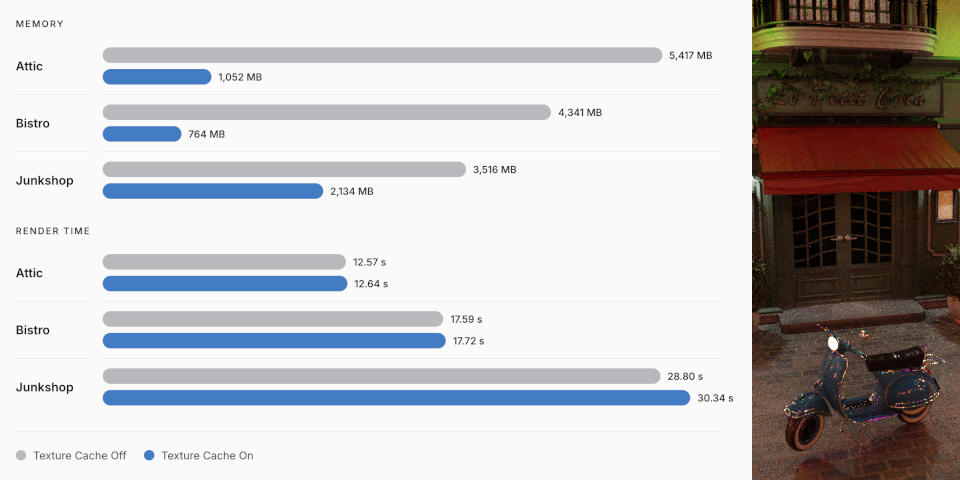
Cycles’ new texture cache system can slash the memory needed by Blender’s production renderer for scenes like the Bistro demo, at the cost of a small increase in render time.
4. Cycles: new texture cache cuts memory usage up to 80%
There are a number of changes to Blender’s native engines in Blender 5.2, but one of the biggest is the new texture cache in Cycles, Blender’s production renderer.
As in renderers like Arnold and Redshift, the textures used in a 3D scene are automatically converted into .tx files, and regenerated when the scene changes.
.tx textures are tiled and mipmapped, reducing memory use, since Cycles doesn’t need to load textures that appear a long way from the render camera at full resolution.
The memory saving is highly scene-dependent, and mainly benefits scenes with a lot of separate image textures, but it can be significant.
In the standard Blender demo scenes, it reduces memory use by up to 80%, the largest saving being in the Bistro scene.
The downside is an increase in disk space used – required to store the cache – and render time, although to judge from the benchmark test results above, it isn’t a particularly significant one.
The implementation is intended to work automatically out of the box, but there are are additional controls for rendering on render farms, and for viewport rendering.
The texture cache is also now used for Open Shading Language, which previously used OpenImageIO, which should improve performance when rendering OSL shaders.
The new Delaunay algorithm used by Grease Pencil’s Fill Tool fills freehand strokes with color more quickly and accurately than the old pixel-based flood fill system.
5. Grease Pencil: new Delaunay solver fills strokes more accurately
We debated which of the other toolsets to single out in this article, since the Sequencer and Compositor also got sizeable updates in Blender 5.2, but in the end, we opted for Grease Pencil.
There are a number of changes to Blender’s 2D animation and storyboarding toolset, but one of the biggest is the new Delaunay algorithm for the Fill Tool.
It creates exact geometry from the strokes it fills, automatically detecting gaps, is zoom-independent, supports inverse filling, and often just runs faster than the previous algorithm.
In addition, when converting freehand strokes with the draw brushes to curves, it is now possible to choose Bézier, Catmull-Rom, or NURBS curves.
For line materials using dots or squares, the dots can now be generated at render time, a workflow “orders of magnitude faster” than before.
Blender’s Sequencer video editor gets a new Compositor effects strip, making it possible to access compositing node trees – used here to create a tiled fade – from the timeline
Other changes: what’s new in the other key toolsets?
Blender’s UI gets a lot of updates, but one that stood out is Scroll to Active, for automatically scrolling the Outliner to center on the object selected in the 3D viewport.
Other highlights include a Swap Dimensions toggle for swapping renders between portrait and landscape, and gizmos for adjusting the orthographic scale of cameras in the 3D viewport.
In the 3D modeling toolset, 3D text now properly supports combining characters above and below the line, so accents should now display correctly.
UV editing gets point snapping in the UV Editor, and a new operator for selecting flipped faces.
The sculpting toolset gets a new Scene Project brush, which works like the Shrinkwrap modifier, but with the benefit of being able to paint the effect onto a model locally.
It is also now possible to add 3D primitives like cubes and cylinders in Sculpt Mode.
For animation, the in-between operators are now usable in Object Mode, and you can select keys by type in the Dope Sheet.
There are also now modes for looped playback, making it possible to cycle endlessly through an animation when previewing it, or to bounce backwards and forwards.
Eevee, Blender’s real-time renderer, gets a major – and in some scenes, compatibility-breaking – clean-up of the screen space ray tracing pipeline.
The implementation of Fast GI has been similarly overhauled, which will change the look of existing scenes that use it, and of Eevee’s ambient occlusion pass.
Eevee also now supports the same instancing optimizations as the Workbench renderer, which can lead to a “2x speed-up in instance-heavy scenes”.
The built-in Compositor gets a lot of updates, adding 35 new nodes and six new socket types.
There are also new readymade compositor assets for mimicking the look of film grain, applying painterly looks to footage, and transforming 3D coordinates between world and camera space.
The Sequencer video editor gets a new Compositor effects strip, making it possible to run compositor node trees directly from the timeline.
The Sequencer’s scopes now support the HDR and wide color gamut spaces introduced in Blender 5.0, while text strips now support style presets and line spacing.
The VR toolset gets a new location scouting feature, making it possible to block out camera views inside the 3D environment, assessing lens settings and focus.
For pipeline integration, it is now possible to import and export point clouds in glTF format, and color spaces are now converted to .blend color space when importing USD data.
The update also moves Blender to Hydra 2.0, the latest version of the USD rendering framework. Existing render delegates “should continue to work without changes”.
Blender also now supports remotely hosted asset libraries, making it possible for studios to set up online libraries of shared assets for artists to browse.
The Python API gets updates to the handling of annotations, Geometry Nodes modifier properties, and Sculpt Mode auto-masking settings.
License and system requirements
Blender 5.2 LTS is compatible with Windows 8.1+, macOS 13.0+ and glibc 2.28+ Linux. It’s a free download. The source code is available under a GPLv3 license.
Read the Blender Foundation’s overview of the new features in Blender 5.2 LTS
Read a longer list of new features in the Blender 5.2 release notes
Have your say on this story by following CG Channel on Facebook, Instagram and X (formerly Twitter). As well as being able to comment on stories, followers of our social media accounts can see videos we don’t post on the site itself, including making-ofs for the latest VFX movies, animations, games cinematics and motion graphics projects.