
BiteTheBytes releases World Creator 2026.3
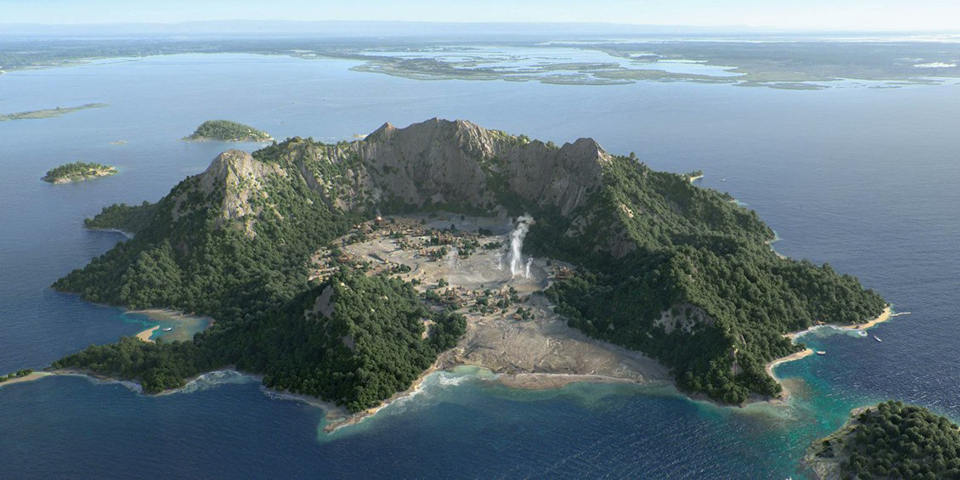
A recent image created using World Creator by Pixomondo Art Director Mujia Liao.
BiteTheBytes has released World Creator 2026.3, the latest version of its GPU-based terrain-generation software for game development, motion graphics and VFX work.
It’s a big update, adding new systems for having terrain adapt automatically to hero objects placed on it, and for focusing objects around the camera position to keep scenes lighter.
It is also now possible to import real-world elevation data into WorldCreator in a range of new file formats, where it can be used as a starting point for terrain.
In addition, BiteTheBytes has reduced the price of the software, and raised the revenue cap on the Indie edition.
A procedural GPU-based terrain generator used by leading games and VFX studios
World Creator enables artists to create terrain through a combination of procedural and manual workflows.
Artists can create terrain using a layer-based workflow, sculpting the basic 3D forms, and generating linear land forms like mountain ranges, rivers and roads along vector paths.
The terrain can be modified using filters, including those mimicking the effects of erosion and sediment deposition, previewing the results using World Creator’s built-in ray tracing renderer.
Users can export terrain to DCC applications and game engines in 3D formats like OBJ, FBX and glTF, or as 2D texture maps, including height maps and flow maps, with support for 32-bit EXRs.
The software has been used by artists at games and VFX studios including Blizzard Entertainment, Crytek, Blur Studio and Cinesite.
World Creator 2026.3: terrain adapts automatically to objects placed on it
World Creator 2026.3 introduces some interesting new workflows, including the option to have terrain automatically adapt to objects placed on it.
You can see the workflow, which helps to integrate hero objects into terrain, at 00:36:00 in the recording of the recent World Creator livestream embedded above.
The system is complemented by a new Distribution type, Object Area, which distributes terrain effects and materials around manually placed objects.
Distribute detail objects close to the render camera to keep scenes lightweight
A second new Distribution, Camera, makes it possible to bind objects to the camera position.
The workflow ensures that objects are distributed near to the camera where they will be most visible, adding a lot of visual detail to renders while keeping scenes relatively lightweight.
Import real-world elevation data to use as a starting point for terrain
World Creator 2026.3 also adds support for common GIS and geospatial data formats, making it possible to import real-world elevation data, and use it as the basis for terrain.
Formats supported include GeoTIFF, HGT, DTED, Arc/Info ASCII Grid (Esri Grid), VRT, and XYZ.
Prices down, and revenue cap removed from the Indie edition
BiteTheBytes has also cut the price of the software, and made it more accessible to indie artists.
For individual artists, perpetual Indie licenses now cost $99, down $50 since the previous release. Rental costs $49/year, down $50/year.
The revenue cap on Indie licenses – previously set at $50,000/year – has also been lifted.
Updated 28 April 2026: The revenue cap is now back again, although it has been raised to $100,000/year.
For artists earning under $200,000/year, perpetual Professional licenses now cost $199, down $50. Rental costs $99/year, down $100/year.
For larger firms with revenue under $1 million/year, perpetual Studio licenses now cost $399, down $100. Rental costs $199/year, down $50/year.
And for the largest studios, perpetual Enterprise licenses now cost $1,499, down $170. Rental costs $799/year, down $490/year.
Price and system requirements
World Creator 2026.3 is available for Windows 10+. Integration plugins are available for Blender, Cinema 4D, Godot, Houdini, Unity and Unreal Engine.
You can find details of the new pricing in the story above.
Read a list of new features in World Creator 2026.3 in the online release notes
Have your say on this story by following CG Channel on Facebook, Instagram and X (formerly Twitter). As well as being able to comment on stories, followers of our social media accounts can see videos we don’t post on the site itself, including making-ofs for the latest VFX movies, animations, games cinematics and motion graphics projects.