
Get free Maya character rigging toolset mGear 5.4
Originally posted on 4 September 2025. Scroll down for news of the mGear 5.4 update.
The mGear development team has begun its 5.x updates to mGear, its open-source character rigging framework for Maya.
mGear 5.1 updated mGear’s RBF Manager to improve compatibility with Shapes, Brave Rabbit’s popular blendshape editor.
mGear 5.2 introduces a new system of Blueprint Guides and xPlorer, a Softimage-inspired alternative to Maya’s Outliner.
mGear 5.3 adds a range of new tools, including automated tools for transferring blendshapes between meshes and generating Set Driven Key setups from character poses.
mGear 5.4 introduces a new unified facial rigger, an updated Anim Picker interface, and a new Blocking Ghosts feature for animators.
A versatile framework for creating modular character rigs
First released in 2015, mGear was originally based on Gear, Blur Studio technical animation supervisor Jeremie Passerin’s Softimage rigging framework, although it isn’t an exact copy.
It provides artists with a library of customisable rig components for different body parts, and is intended to generate “an infinite variety of rig combinations … without programming knowledge”.
As well as Shifter, the rigging framework, mGear includes a customizable Anim Picker interface, a RBF Manager, and shot-sculpting tool Crank
The toolset has been used by a range of VFX, animation and game development studios: the user reel includes projects by El Ranchito, Mac Guff, Unseen, and Pendulo Studios.
mGear is free and open-source, but lead developer Miquel Campos’s company, mcsGear, provides commercial support and rigging services, which fund development.
mGear 5.1: Update to RBF Manager resolves compatibility issues with Brave Rabbit’s Shapes
mGear 5.1 is a relatively minor update, but it includes quality-of-life improvements, particularly if you use Shapes, Brave Rabbit’s popular toolset for creating and editing blendshape targets.
Both mGear and Shapes use weightDriver, Brave Rabbit’s free Maya node for managing relationships driven through a RBF solver.
From version 5.10, released in late 2023, Shapes has used version 4.0 of weightDriver, which is not backwards-compatible with previous versions.
Since previous versions give better results in mGear, it supported both weightDriver 3.6 and 4.0, but that could cause conflicts with Shapes.
As of mGear 5.1, users can choose whether to use mGear’s own version of weightDriver or an external version, making it possible to update Shapes without issues.
There are also updates to Shifter, making it possible to match FK/IK set-ups to arbitrary limb lengths, and to ueGear, mGear’s new bridge to Unreal Engine.
Updated 28 January 2026: The mGear team has released mGear 5.2.
Highlights include xPlorer, a “fresh alternative to Maya’s Outliner”, inspired by the design of other DCC tools including Blender, Cinema 4D and the much-missed Softimage XSI.
A new system of Blueprint Guides makes it possible to define standardized rig setting that can be shared across multiple characters, with support for per-component overrides.
The Shifter UI has also gone through a “complete overhaul”, and now supports drag-and-drop, JSON-based configuration for file I/O, and comes with prebuilt templates for common tasks.
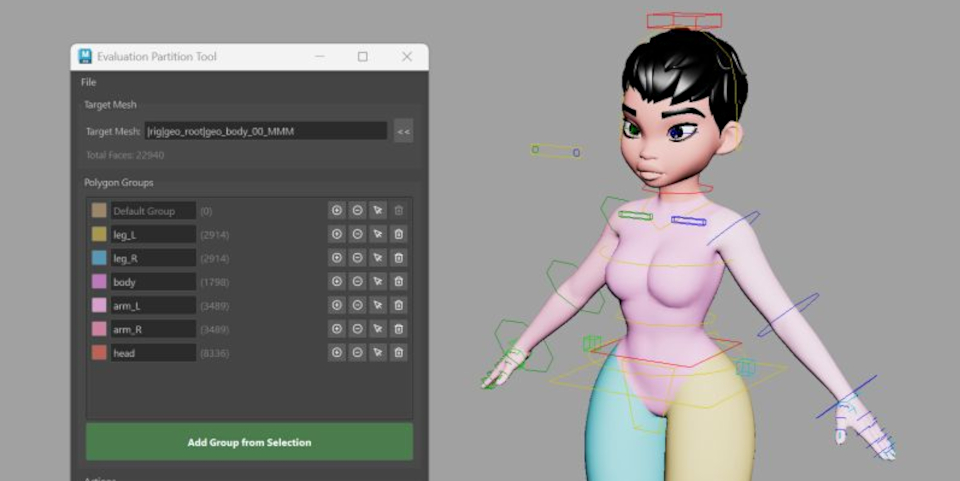
Updated 7 April 2026: The mGear team has released mGear 5.3.
It’s a varied update – Campos describes it as “our most feature-rich release yet” – adding a range of new tools: both new rigging tools and quality-of-life features.
New Blendshape Setup Transfer tool cuts manual cleanup time
Of the new tools, one of the most significant is the Blendshape Setup Transfer tool – which, as the name suggests, transfers blendshape setups between character meshes.
It automates common, but time-consuming, clean-up processes, rebuilding combination shape networks and removing blendshape targets that exist, but produce no visible deformation.
SDK Creator generates Set Driven Key setups from character poses
Another major new feature is the SDK Creator – the SDK in question being Set Driven Key rather than Software Development Kit.
It generates Set Driven Key setups directly from timeline poses, making it possible to pose a character and have the tool generate the setup, rather than creating it one value at a time.
Since the previous release, mGear has also gotten a Wire to Skinning tool, which automatically converts Wire deformers – often used for shape exploration – to production-ready skin clusters.
Other new quality-of-life tools
mGear 5.3 also adds a number of nice quality-of-life tools.
A new Guide Template Manager provides a browsable library of rig templates with thumbnail previews, which can then be dragged and dropped into a scene.
The new Bookmarks Tool saves, restores and isolates selection bookmarks.
The Matcap Viewer provides a quick viewport material preview using matcap materials.
Now updated to Python 3.13, in line with VFX Reference Platform
In addition, mGear 5.3 moves the software to Python 3.13, as set out in the current CY2026 spec for VFX Reference Platform, removing the old Python 2 compatibility layer.
Updated 14 October 2026: The mGear team has released mGear 5.4.
It’s another big update, with character riggers getting Facial Rigger 3.0, a new facial rigging system that unites the old eye, lips and brow riggers on a shared facial engine.
As well as meaning that the three formerly separate riggers now share a common interface and workflow for picking geometry, the facial rig now builds with the rest of the character.
The previous version of the Eye Rigger is still available, so existing rigs build as normal.
Other new rigging features and performance updates
Other new rigging features include Spring Manager 2.0, a new version of mGear’s system for adding secondary motion to trailing body parts or clothing.
It has been rebuilt with separate backends for different solvers: the original Classic solver, and new Classic Gravity and Bone Dynamics solvers.
There are also three new Rigbits tools for importing and exporting Lattice, Shrink Wrap and Proximity Wrap deformers.
And as we reported last month, the mGear team has rolled out Anim Picker 2.0, the latest version of mGear’s animation picking tool.
It’s a complete rewrite of the original picker, introducing vector (SVG) shapes, interactive widgets, viewport pins, conditional visibility, mirroring and a heads-up display mode.
In addition, rigs now build “about twice as fast” as in previous releases.
Animation workflow improvements
Animators get Blocking Ghosts (shown above), a new 3D onion skinning system that shows semitransparent ghosts of a character at each keyframe of the controls that the user is watching.
There is also a new Animbits Hub , which provides quick access to commmonly used controls.
License and system requirements
mGear is compatible with Maya 2022+, running on Windows, macOS and Linux.
ueGear is compatible with Unreal Engine 5.2+.
The source code for both applications is available under an open-source MIT licence, and the compiled binaries are free downloads.
Read a list of new features in mGear in the online changelog
Have your say on this story by following CG Channel on Facebook, Instagram and X (formerly Twitter). As well as being able to comment on stories, followers of our social media accounts can see videos we don’t post on the site itself, including making-ofs for the latest VFX movies, animations, games cinematics and motion graphics projects.