
Try ByHand, Truong CG Artist’s free digital sculpting software
A sculpting session in ByHand, Truong CG Artist’s new free digital sculpting software, recorded by 3D Character Artist Nguyen Tran (3D3DO Studio). Note: Vietnamese narration.
CG artist Châu Võ Bá Trường – better known as Truong CG Artist – has released ByHand, a promising new free digital sculpting application.
The software, which is still in early development, is a fast, intuitive tool designed “for pure form study and digital clay modeling”, built using the open-source Godot game engine.
A new tool from the popular Maya character rig creator
Regular readers of CG Channel will know Truong CG Artist from his popular Maya creature and character rigs: our parent company, The Gnomon Workshop, often uses them in its tutorials.
However, he has recently begun developing his own CG software, beginning last year with comparative animal anatomy reference app Anastomia.
A ‘clean, distraction-free’ digital sculpting application
In contrast, ByHand is a much more ambitious project: a complete digital sculpting application.
Truong says that he began to develop it “out of pure frustration” with existing sculpting software.
“I got tired of waiting for giant software companies to fix long-standing bugs or add basic, quality-of-life features,” he says.
However, ByHand isn’t an attempt to replace established sculpting tools, like ZBrush or 3DCoat, in studio pipelines.
Truong describes it as a “quiet, clean, and distraction-free space for artists who want to focus entirely on the joy of sculpting without the technical noise”.
A modern replacement for the much-missed Sculptris?
To judge from the demo video embedded at the top of the story, ByHand could fill a similar gap in the market to Sculptris, Tomas Petersson’s much-missed claylike sculpting app.
Originally a free standalone application, it provided a quick, intuitive way to create character and creature models, either as portfolio pieces, or for use in games and VFX projects.
Sculptris was later acquired by Pixologic and incorporated into ZBrush, and is no longer developed as a standalone tool.
Designed with simplicity and responsiveness in mind
Truong describes ByHand’s design goals as simplicity of interface design – “not everyone wants to learn a million complex technical settings just to create a shape” – and real-time responsiveness, enabling artists to “sculpt directly … without any computer lag”.
For artists aiming to print their sculpts, a bonus is 3D print accuracy.
“In my time doing realistic 3D portraits, I noticed a huge disconnect,” says Truong. “The final physical 3D print often looked completely different from the screen because of how virtual 3D cameras distort perspective on flat monitors. ByHand aims to fix this … from the ground up.”
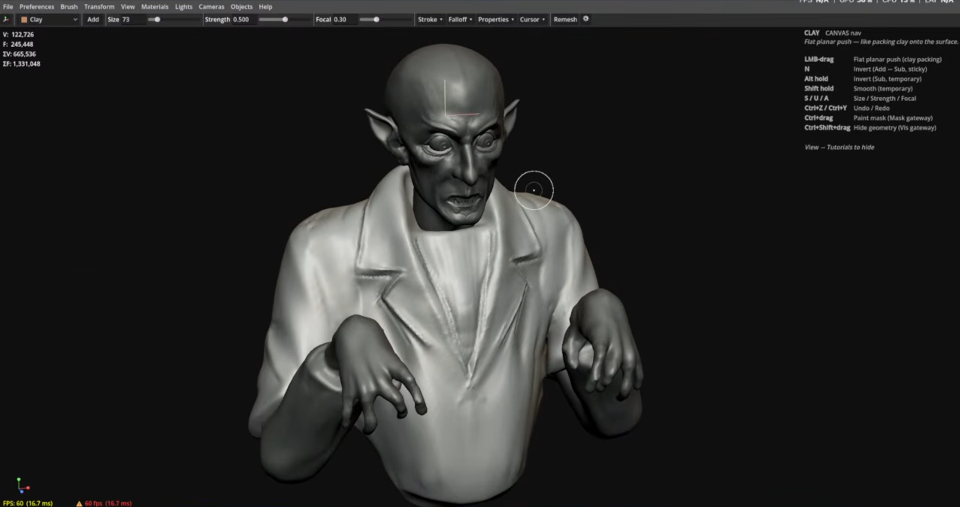
ByHand prioritizes simplicity of UI design, with users sculpting in a clean, uncluttered viewport.
So what sculpting features does ByHand currently have?
ByHand is still very early in development – at the time of writing, the current release is version 0.1.1 – but it already has a reasonable set of features.
That includes a simple set of ZBrush-like sculpting brushes (Move, Clay, Inflate, Smooth, and so on), plus controls for brush size, strength and falloff, and support for symmetry sculpting.
Users work in a large, uncluttered viewport, with contextual tips and keyboard shortcuts for the tool currently in use displayed in a corner of the screen.
The software supports Matcap materials, and comes with a range of lighting features for previewing sculpts in context, including support for HDRI environment lighting.
Other features listed in the release notes include a Remesh tool for generating animation-friendly topology, and automatic screenshotting for recording timelapses of a sculpt.
ByHand can import and export 3D models in OBJ and glTF format – FBX is still a work in progress – making it possible to export sculpts to other digital sculpting apps to refine them, or to use them directly in DCC software like Blender, Cinema 4D or Maya.
Free to use in commercial projects – but consider donating to support development
ByHand’s Gumroad page describes the software as “free, for everyone, forever, including commercial work. No license tiers, no per-seat fees, and no activation keys.”
However, development is purely funded through donations, so while you can download it for free, if you like the software, consider making a voluntary payment to support future work.
At the time of writing, the online documentation is mainly a changelog, but you can get support from other uses on the Discord server.
Price and system requirements
ByHand 0.1 is compatible with Windows 10+. Linux and macOS builds are planned. The software is free, but you can make a voluntary donation on Gumroad to support development.
Download digital sculpting software ByHand from Gumroad
Read a full list of new features in ByHand in the online changelog
Have your say on this story by following CG Channel on Facebook, Instagram and X (formerly Twitter). As well as being able to comment on stories, followers of our social media accounts can see videos we don’t post on the site itself, including making-ofs for the latest VFX movies, animations, games cinematics and motion graphics projects.