
Check out free cross-platform retopology tool AutoRemesher
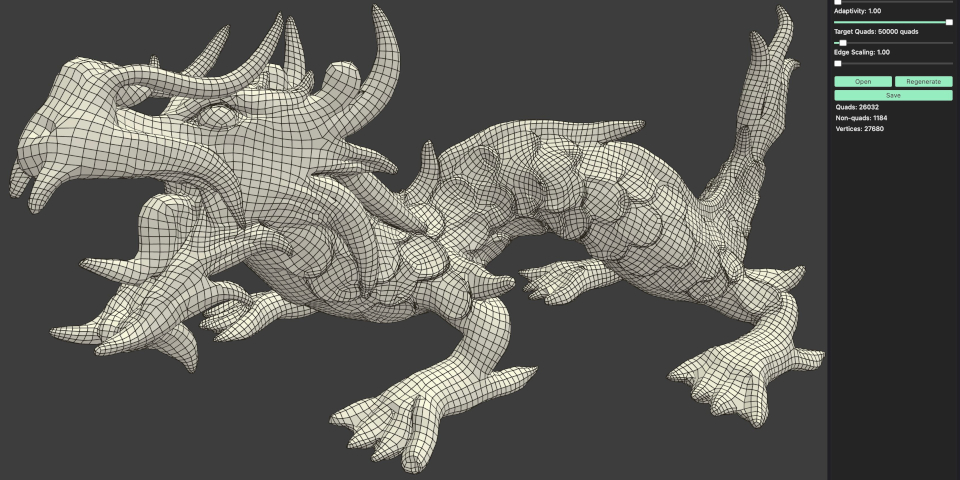
Developer Jeremy Hu has officially released AutoRemesher, his open-source retopology tool.
The standalone app, which converts high-poly meshes like 3D scans or sculpts into animation-friendly, low-poly, all-quad geometry, is available for Windows, Linux and macOS.
Shortly after AutoResher 1.0 was released earlier this week, CG artist Adrien Rouquié released the AutoRemesher Bridge for Blender, a plugin connecting it to the open-source 3D software.
A free cross-platform standalone tool for remeshing 3D models to clean, all-quad topology
AutoRemesher has been in development for some time: we first wrote about the software when it was released in alpha, back in 2020.
Since then, the software libraries it uses have changed, and so has the open-source license under which it is released – from GPL to a more commercial-project-friendly MIT license.
However, the premise remains the same: you feed in a high-res model and AutoRemesher automatically converts it to all-quad, low-poly geometry suitable for animation or real-time use.
A simple set of slider controls includes options to set target poly count, and to preserve sharp edges.
The software only imports and exports OBJ files, and does not generate UVs for the retopologized model.
However, it’s a free alternative to the native tools in 3D modeling and digital sculpting apps, like ZBrush’s ZRemesher and Blender’s Quad and Voxel remeshers.
The topology it generates looks good, and judging by early user tests, performance has improved since the original alpha release.
#AutoRemesher 1.0 came out and I couldn't resist vibe-coding a tiny Blender bridge for it.
Nothing fancy, but it lets me send the selected mesh to AutoRemesher and bring the result back into Blender. pic.twitter.com/UO9wAjAUqg
— Adrien Rouquié (@adri_flex) July 7, 2026
Now has a community-developed Blender integration
AutoRemesher also now has an unofficial Blender integration, developed by CG artist Adrien Rouquié.
The AutoRemesher Bridge for Blender writes out a temporary OBJ from Blender, which AutoRemesher processes, then exports a remeshed OBJ, which Blender imports as a copy.
The add-on is vibe coded, “so expect rough edges”, but reports from early users are positive.
License and system requirements
AutoRemesher is compatible with Windows, Linux and macOS. It’s a free download, but you can donate to support development. The source code is available under a MIT license.
The AutoRemesher Bridge for Blender is compatible with Blender 4.2+. The source code is available under a GPLv3 license.
Download free standalone retopology tool AutoRemesher from GitHub
Download the free AutoRemesher Bridge for Blender
Have your say on this story by following CG Channel on Facebook, Instagram and X (formerly Twitter). As well as being able to comment on stories, followers of our social media accounts can see videos we don’t post on the site itself, including making-ofs for the latest VFX movies, animations, games cinematics and motion graphics projects.