
Reallusion launches AccuFace 2
Reallusion has released AccuFace 2, the latest version of its AI video mocap plugin for iClone, its character animation software for games, VFX and motion graphics work.
The update introduces a new AI model optimized for the CC5 HD facial expression profile; and improves performance with footage shot in low light levels, or at a distance.
A new Expression Curves System makes it possible to control more precisely how an actor’s facial movements map to those of a 3D character, and the setup process has been streamlined.
In addition, the plugin is now GPU-accelerated on AMD as well as NVIDIA GPUs.
Extract facial motion from video of an actor and stream it to a 3D character in iClone
AccuFace (strictly, it’s styled ‘accuFACE’) extracts facial motion data from footage of an actor – either a live feed or pre-recorded video – and streams it to iClone in real time.
It is intended for use with standard USB webcams or laptop cameras, so it can work with relatively low-quality footage: the recommended minimum is 720p resolution and 30fps.
It includes controls for denoising and smoothing the raw animation data, and for adjusting the strength of motion of different regions of the face when retargeting animation to a 3D character.
You can see a comparison with other video mocap solutions for iClone – both Reallusion’s own, and those from third parties – in our story on AccuFace 1.
AccuFace 2: new AI model optimized for the CC5 HD facial expression profile
Whereas AccuFace 1 was designed for Reallusion’s Character Creator 4 (CC4) characters, AccuFace 2 introduces a new AI model optimized for the HD facial animation profile introduced in Character Creator 5 (CC5).
The changes should particularly improve the quality of mouth animation, with support for “up to 128 lip morphs” on top of the existing support for iClone’s AccuLips lip sync system.
Better performance when shooting in low light levels, or from a distance
The new model should also performs better on footage or live feeds captured under conditions that are traditionally difficult for AI mocap.
AccuFace now automatically boosts gamma values if the source is captured under low light levels, particularly when tracking actors with dark skin tones.
It also copes better if an actor’s face only occupies a small region of the frame: for example, when doing both full-body and facial capture from a single video source.
And that region really can be small – according to Reallusion, AccuFace 2 can work from a region of the frame just 120 x 120px in size.
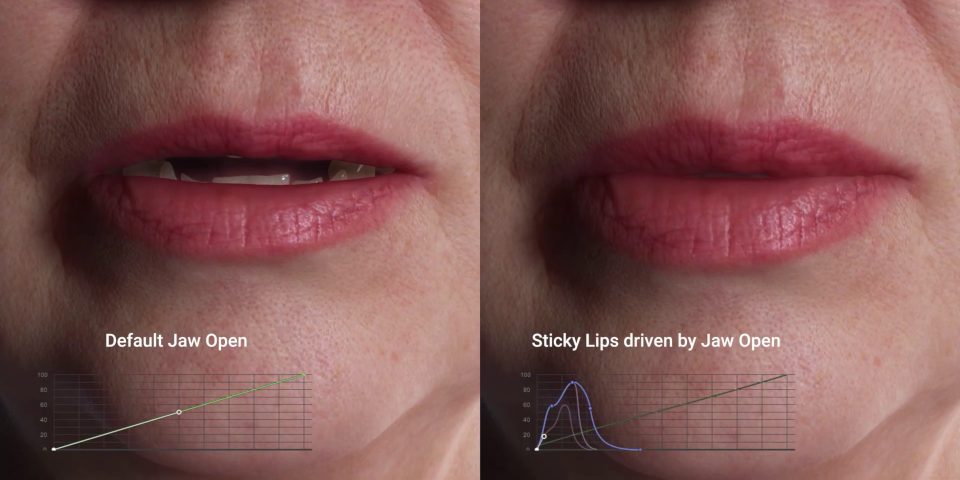
Expression curves fine tune the mapping of an actor’s facial movements to 3D character
Another key change is the new Expression Curves System, for controlling how an actor’s facial movements map to those of the 3D character.
Whereas AccuFace 1 used linear mapping, AccuFace 2 provides curve controls, making it possible to control mapping more precisely.
It is also now possible to have a single tracking single drive multiple morphs on the 3D character, making it easier to create realistic follow-through by driving secondary animations.
Support for AMD as well as NVIDIA GPUs
The set-up process has also been simplified: unlike the original release, AccuFace 2 doesn’t require an absolute full-face neutral pose, or to be recalibrated for each new actor.
In addition, AccuFace is now GPU-accelerated on AMD as well as NVIDIA GPUs: whereas AccuFace 1 was NVIDIA-only, version 2 is compatible with the AMD Radeon RX 5700 and above.
Supported in iClone 8.74 and above
In related news, Reallusion has released iClone 8.74, the latest version of the software.
The main change is support for AccuFace 2’s new features, but there are also fixes to FBX export and the Unreal live link.
Price and system requirements
AccuFace 2 is compatible with iClone 8.74+. Version 2 has a MSRP of $299 – down $200 from the original release – although at the time of writing, it is available at a launch discount.
iClone is compatible with Windows 10+. A perpetual license of the full edition costs $599. Subscriptions start at $59/month or $199/year. iClone Personal is free.
Read an overview of the new features in AccuFace 2 on Reallusion’s website
See a feature comparison table between AccuFace 1 and 2
(At the foot of the webpage)
Have your say on this story by following CG Channel on Facebook, Instagram and X (formerly Twitter). As well as being able to comment on stories, followers of our social media accounts can see videos we don’t post on the site itself, including making-ofs for the latest VFX movies, animations, games cinematics and motion graphics projects.