
Autodesk adds generative AI capabilities to Flow Studio
Autodesk has added new generative AI capabilities to Autodesk Flow Studio, its online platform for inserting 3D characters into video footage.
The new Wonder 3D AI model generates simple 3D models from text prompts or reference images, or remeshes and textures existing 3D assets.
Below, we’ve put together a brief set of FAQs about Wonder 3D – but first, a quick recap about Autodesk Flow Studio itself.
An AI-powered CG film-making platform that can export scenes to Blender, Maya and UE5
Launched in 2023 and originally known as Wonder Studio before it was acquired by Autodesk, Flow Studio is an AI-powered, cloud-based platform for VFX and animation work.
It provides an all-in-one solution for inserting CG characters into video footage, tracking the motion of a live actor, replacing them with a CG character, and automatically matching the lighting of the character to the background.
As well as the final rendered video, Flow Studio generates clean plates and alpha masks for the actor, camera tracks, and motion-capture data.
The data generated can also be exported as a 3D scene to Blender, Maya and Unreal Engine, or in USD format for use in applications like 3ds Max, Houdini or Unity.

So what is Wonder 3D?
To that, the most recent update added a new feature called Asset Creator.
It’s a more conventional generative AI system, enabling users to generate 3D models – props or unrigged 3D characters – from text prompts or reference images.
The resulting assets can be downloaded in OBJ or STL format.
According to Autodesk’s blog post on Wonder 3D, the underlying AI model, it can also be used to optimize existing geometry, or to add new textures to 3D assets.
Like Flow Studio’s other tools, it’s credit-based, with each generation costing 20 credits, meaning that users with free subscriptions could generate 15 3D models per month.
Are the models that Wonder 3D generates usable in production?
With Wonder 3D, Autodesk is entering a relatively populated part of the market.
Alternatives include both commercial credit-based services like Tripo Studio and Deemos/Hyper3D’s Rodin, and free non-specialist services like Canva’s AI model generator.
Judging by the demo video at the top of the story, the models that Wonder 3D generates are of a similar level of quality to those services: kind of a low-to-mid level of detail.
Unless you’re working on a relatively stylized project, they look to be base assets that you could refine manually, rather than something you would want to use directly.
Autodesk’s blog post seems to support that assessment, stating that Flow Studio’s generative AI capabilities are “built for iteration, not perfection”.
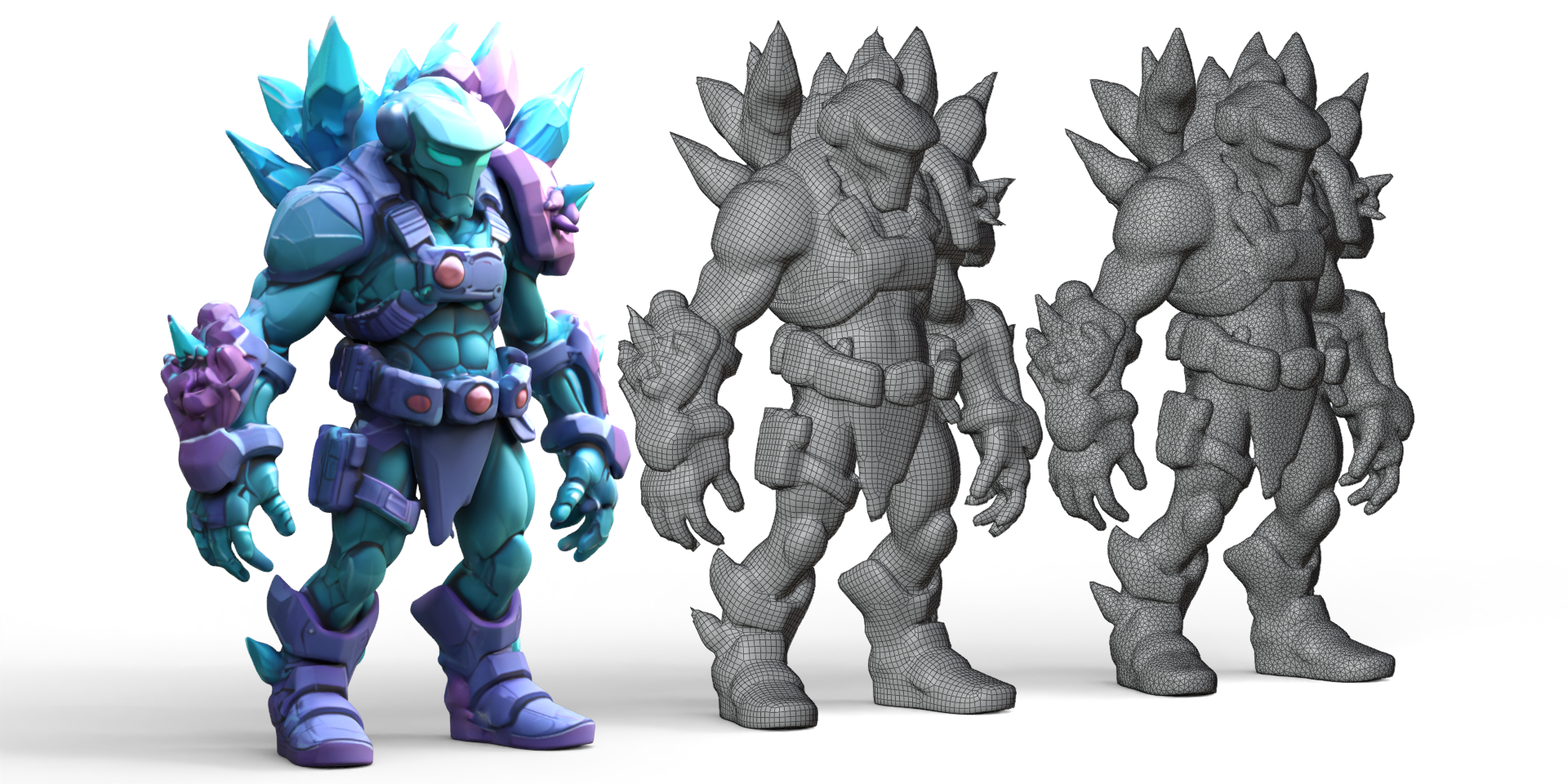
The video also doesn’t show the topology of the models generated, so it’s hard to assess how usable they would be for animation.
Updated 13 March 2026: Autodesk has sent us an image of the topology of a 3D character generated with Wonder 3D (embedded above), so you can judge for yourselves.
What data has Wonder 3D been trained on?
Autodesk’s blog post also doesn’t say what data the Wonder 3D model was trained on.
The old Wonder Studio terms of service gave Autodesk a non-exclusive licence to use content created via the platform to develop its AI models, although that was for the original toolset.
We’ve contacted Autodesk to ask for more information, and whether Wonder 3D has been trained on users’ data, and will update if we hear back.
Updated 18 March: Autodesk has told us that Wonder 3D was trained on “synthetic data and third-party data sources”, and “no data from Autodesk users” was used.
The firm wouldn’t specify which third-party data sets were used for training, but said that they included “commercially licensed, open source, and company commissioned materials”.
In addition, Wonder 3D uses third-party AI models.
Currently, Black Forest Labs’ FLUX is used for text-to-image functionality, but Autodesk plans to integrate more third-party models in future.
Do Autodesk users want Wonder 3D?
While many artists regard Flow Studio’s core tools as a ‘good’ use of AI, generative AI is far more controversial among Flow Studio’s users, and its potential future users.
So far, the reaction on social media has been mixed – although by no means as negative as for some recent launches of new generative AI tools from major DCC tools developers.
On X, responses range from “game-changer” to “AI slop”.
Perhaps more constructively, one user asks whether Wonder 3D can export “clean quads and UV maps for rigging”, to which there currently appears to be no clear consenus.
Price and system requirements
The Autodesk Flow Studio platform is browser-based, and runs in Chrome or Safari. It does not currently support mobile browsers.
Processing video consumes credits, provided as part of free or paid subscription plans. You can find details of current pricing in this story.
Read Autodesk’s blog post on the Wonder 3D generative AI model
Read more about latest features in Autodesk Flow Studio in the online changelog
(Login required)
Have your say on this story by following CG Channel on Facebook, Instagram and X (formerly Twitter). As well as being able to comment on stories, followers of our social media accounts can see videos we don’t post on the site itself, including making-ofs for the latest VFX movies, animations, games cinematics and motion graphics projects.