
ArcBrush is a free node-based image editor and texture editor
Motion designer and Meta Reality Labs Creative Director Albert Omoss has released ArcBrush, a free node-based image editor created as an alternative to Photoshop.
The desktop software, which also includes optional paid-for AI nodes, is aimed at game artists, concept artists, illustrators for tasks like generating variant designs and texture processing.
A few months ago I started writing a Photoshop alternative built on a node graph. Mac and Windows, native C++, 75 nodes. Every operation is non-destructive. Paint, masks, warps, the whole toolset. Nothing bakes.
ArcBrush 1.0 is live today! pic.twitter.com/SvOG8T9wpt
— Albert Omoss (@albertomoss) April 28, 2026
A simple free alternative to Photoshop or Substance 3D Designer
Omoss describes ArcBrush as a “Photoshop alternative”, but since it’s node-based, another comparison familiar to CG Channel readers would be Substance 3D Designer.
The software makes it possible to edit 2D images by wiring together nodes in a graph.
In ArcBrush 1.0, there are 75 nodes, for transforming source images, adjusting their colors, color keying, and modifying the results with masks.
There are also more specialist nodes for processing textures, including converting images to normal maps, and for pixel art, including pixelating images and packing them as a sprite sheet.
In the initial release, it looks suited to basic image-processing tasks – and particularly for generating variants of an image quickly: for example, generating color variants of a game asset.
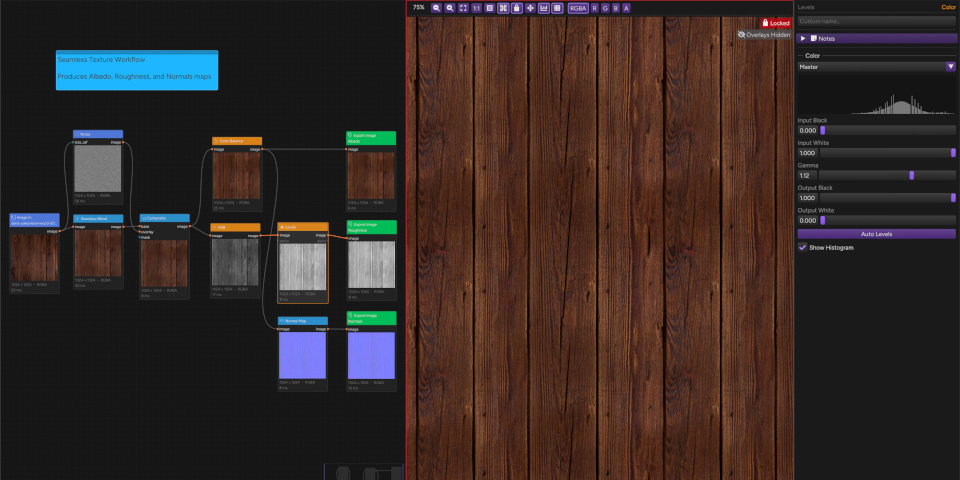
Non-destructive, GPU-accelerated, and compatible with standard art pipelines
Workflow is non-destructive, and there important basic quality-of-life features for organizing and navigating the node graph, including a minimap, node search, and sticky notes.
It’s a native desktop application, which should improve performance, and it’s GPU-accelerated via OpenGL and OpenCV, so it should support any manufacturer’s hardware.
For pipeline integration, you can import and export images is standard bitmap and vector formats, including PNG, JPEG, WebP, TGA, BMP and SVG, although not currently OpenEXR.
ArcBrush also supports the palette file formats of common image editors, including Adobe .ase files and GIMP .gpl files.
Optional nodes for paid-for online AI tasks
There are also nodes for AI-based tasks including background removal, image upscaling and generative AI: both AI image editing, and generating entire source images from text prompts.
Whereas the core app is free, the AI nodes are a paid feature, and require an account.
AI processing is done online using third-party models: Aura SR for upscaling and rembg for background removal, and Black Forest Labs’ FLUX models and Google’s Nano Banana 2 for generative AI.
Price and system requirements
ArcBrush 1.0 is compatible with Windows 10+ and macOS 12.0+. The core app is free, and does not require an account on the ArcBrush website to download or use.
Use of the AI nodes requires an account, and is priced on a credit basis, with credit usage varying with AI model. You can find a table of current pricing on the ArcBrush website.
Download free node-based image editor ArcBrush from the product website
Have your say on this story by following CG Channel on Facebook, Instagram and X (formerly Twitter). As well as being able to comment on stories, followers of our social media accounts can see videos we don’t post on the site itself, including making-ofs for the latest VFX movies, animations, games cinematics and motion graphics projects.