
Hive Auto-Rigger for Maya now creates full joint-based faces
Create 3d Characters has rolled out a big update to Hive Auto-Rigger, the character rigging system included with its Zoo Tools Pro toolset for Maya.
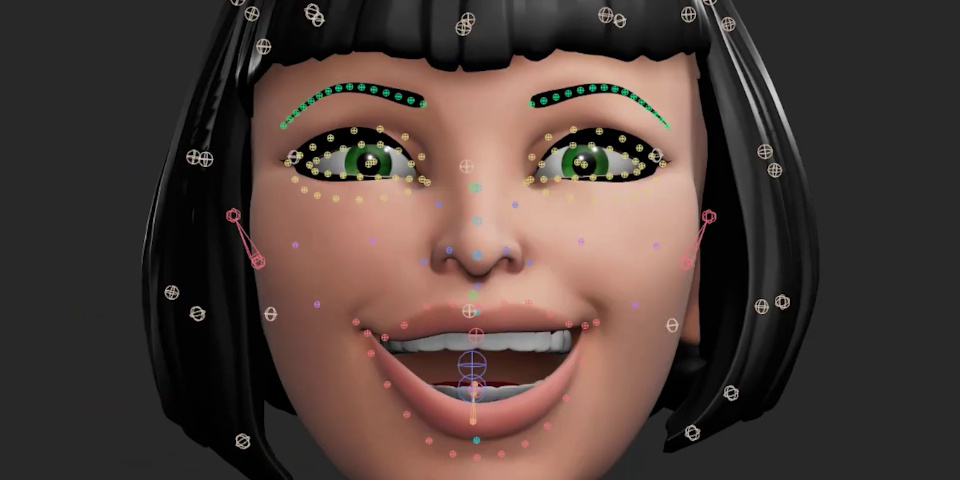
The latest version, available with Zoo Tools 2.12.4, creates full joint-based facial rigs, optimized for real-time performance in game engines like Unity and Unreal Engine.
A versatile Maya riggings system for games, animation and VFX
Hive Auto-Rigger is a modular rig-building system included with Zoo Tools Pro, the popular suite of Maya productivity tools developed by former Weta Digital animator Andrew Silke and former Animal Logic rigger David Sparrow.
For full-body rigs, it includes components for arms, legs, reverse foot setups, FK and spline spines, necks, heads and aim constraints, and supports bendy limbs and squash-and-stretch.
The rigs it creates work without the need to have Zoo Tools installed, so they can be passed over to animators working on vanilla installations of Maya.
Characters can also be exported to other DCC applications and game engines, including 3ds Max, Blender, Houdini, Unity and Unreal Engine, via the accompanying Hive Export FBX tool.
As well as human characters, Hive Auto-Rigger can be used to create creature rigs, and comes with readymade templates including a dog, a horse, a spider, a werewolf and a dinosaur.
Joint-based facial rigs are now officially production-ready
Hive Auto-Rigger also comes with a modular spline joint-based facial rigging system, including components for the eyes, brows, mouth and cheeks.
As of this week’s Zoo Tools 2.12.4 update, the final component, the mouth, is officially out of beta, making joint-based facial rigs production-ready.
As with the full-body rigs, the system is designed for creatures as well as humans – the mouth component also works for snouts – and can be used to create both realistic and cartoon rigs.
And also like the full-body rigs, the facial rigs are game-engine-ready, with Silke describing them as “optimized for real-time performance in Unreal, Unity, and more”.
The release has drawn a lot of positive feedback from riggers and animators on LinkedIn, with Pixomondo Lead Animator Nav Singh describing it as “next level”.
Pricing and system requirements
Zoo Tools Pro is compatible with Maya 2020+ on Windows, Linux and CentOS Linux. You can read more about the other tools it includes in this story.
The software is available by taking out at least one month’s subscription to the Create 3d Characters website, which also includes downloadable assets and access to video training.
You can continue to use it commercially after the subscription ends, so you effectively get a perpetual licence with the first month, which costs $40; after that, it’s $10/month.
See a full list of new features in Zoo Tools Pro
Read more about Zoo Tools Pro for Maya on the Create 3d Characters website
Have your say on this story by following CG Channel on Facebook, Instagram and X (formerly Twitter). As well as being able to comment on stories, followers of our social media accounts can see videos we don’t post on the site itself, including making-ofs for the latest VFX movies, animations, games cinematics and motion graphics projects.