
Nekki releases Cascadeur 2026.2 with animation layers
Nekki has released Cascadeur 2026.2, the new version of the AI-assisted animation software.
It’s a varied update, adding an animation layer system and easing controls for interpolation, updating AI inbetweening and motion generation, and adding BVH animation import.
Create animations based on real-world physics, aided by AI-based tools
Launched in 2019, Cascadeur is intended as an artist-friendly alternative to conventional animation software for game development, motion graphics or visual effects work.
Although it has standard tools for rigging, posing and animating characters, its unique selling point is a set of AI-assisted, semi-automated toolsets.
Key poses can be quickly established for a character via the AutoPosing system, which lets users reposition a small number of joints, and have Cascadeur take care of the rest of the body.
For a jumping character, the software can then calculate a physically correct trajectory between the key poses.
For other types of motion, a separate AI-trained system, AutoPhysics, converts an existing keyframe animation into a physically accurate version of itself.
Once generated, animations may be exported FBX, Collada or USD format for use in other DCC applications, or game engines like Unity and Unreal Engine.
New animation layers system helps edit animations non-destructively
The main new feature in Cascadeur 2026.2 is the new animation layer system.
As in other 3D software, it makes it possible to separate a character’s motion into separate layers, which are then combined additively to form the complete animation.
The workflow makes it possible to edit animation non-destructively by adding or removing layers, or enabling them in different combinations.
The toolset is currently still in alpha, and Nekki says that it plans to update it in future releases.
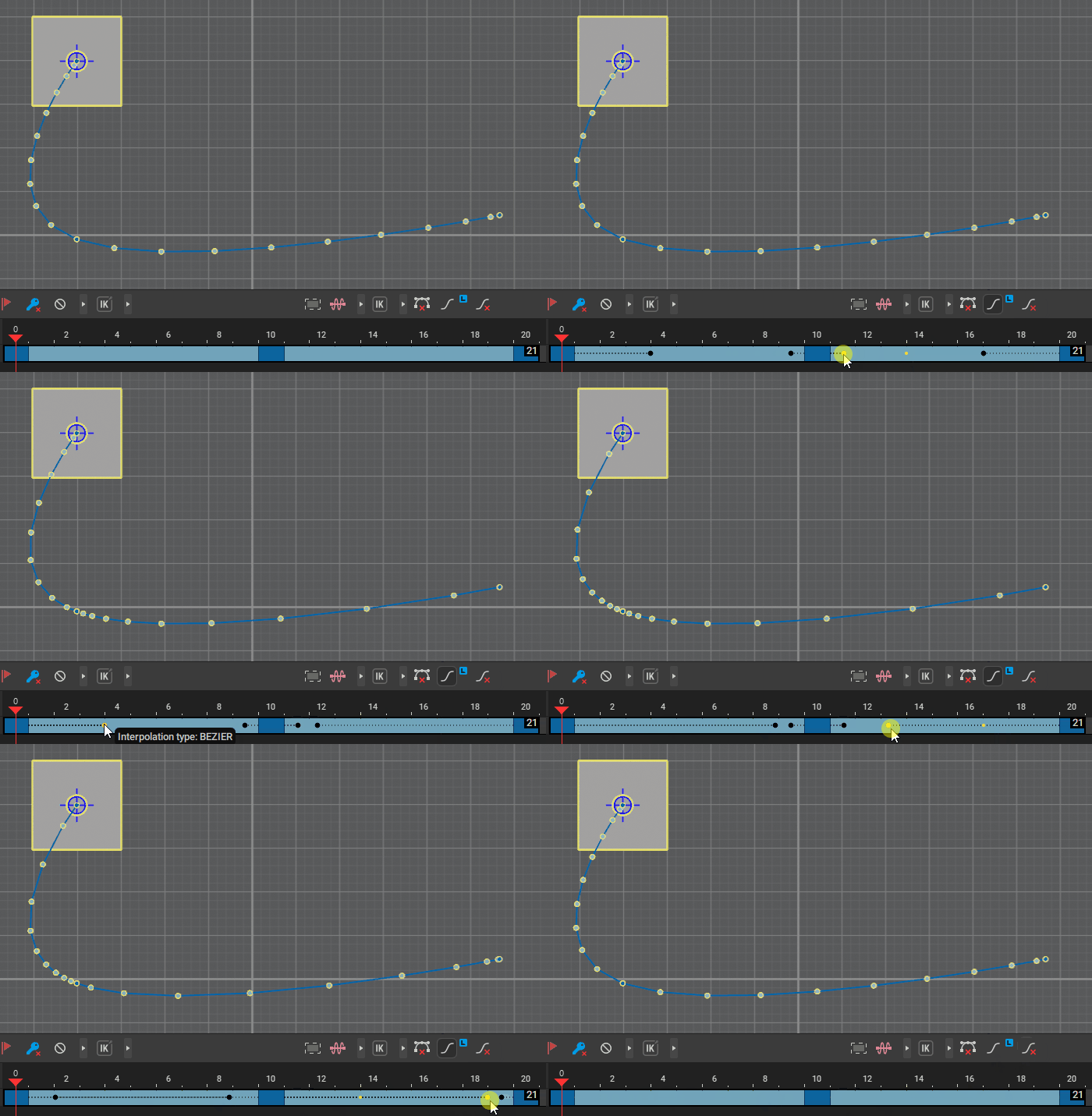
New easing controls for interpolation
The other major addition is Easing for interpolation, making it possible to adjust the spacing of frames along an interpolated trajectory.
That makes it possible to vary the speed at which an object moves along the trajectory without affecting its shape: for example, to create natural acceleration and deceleration effects.
It is available for Cascadeur’s Linear and Bezier Interpolation models.
Updates to the AI motion generation and inbetweening systems
There are also updates to existing features, particularly Root Motion, the new motion-generation system added in Cascadeur 2026.1, which has been renamed… well, Motion Generation.
Both it and Cascadeur’s AI inbetweening system now use AI models trained on larger data sets.
The AutoPosing system now handles quadrupeds better, and takes better account of the surrounding environment when posing humanoid characters’ hands and feet.
Other changes: BVH import, new MCP server, more language support
For pipeline integration, Cascadeur can now import animation data in BVH format, often used for motion capture, although it doesn’t currently read other scene data from BVH files.
The software also now has a “simple” MCP server, making it possible to connect it to external AI tools – for example, to control the software using a LLM like Claude.
Developers get the option to create custom UI elements using PySide, and support for Intellisense in Cascadeur’s Python API modules.
Cascadeur’s own UI is now available in Chinese, Japanese and Korean, as well as English, with further language packs to follow in future releases.
Price and system requirements
Cascadeur 2026.2 is compatible with Windows 10+, Ubuntu 20.04+ Linux and macOS 13.3+.
For users earning under $100,000/year, Indie subscriptions cost $19/month or $96/year. Pro subscriptions cost $49/month or $396/year and add advanced features.
Both are rent-to-own plans, with users qualifying for a perpetual license after one year.
There is also a free edition, which is not licensed for commercial use, and saves animation in its own .casc file format, making it impossible to use in other DCC apps.
Read a full list of new features in Cascadeur 2026.2 in the release notes
Have your say on this story by following CG Channel on Facebook, Instagram and X (formerly Twitter). As well as being able to comment on stories, followers of our social media accounts can see videos we don’t post on the site itself, including making-ofs for the latest VFX movies, animations, games cinematics and motion graphics projects.