
Canva releases Affinity 3.3
Canva has released Affinity 3.3, a major update to its new free application that combines the functionality of Affinity Photo, Affinity Designer and Affinity Publisher into a single product.
The release – Canva’s September 2026 update – adds over 60 new features throughout the software’s image editing, vector design and desktop publishing toolsets.
Highlights include new Mask and Deform Tools for image editing, a new Blend Tool for creating transitions between vector shapes, and a complete new Scripting Studio.
Users with paid subscriptions get access to new AI models – both local and cloud-based – for tasks including image upscaling, automatic matte generation, and SDR-to-HDR.
A new free application that unifies the old Affinity tools
Launched last year, the free Affinity software combines the functionality of the old Affinity tools – Affinity Photo for image editing, Affinity Designer for vector design and Affinity Publisher for page layout – into a single, unified application, dividing it up into separate ‘Studios’ within the interface.
Although you need a paid subscription to use Canva’s online AI tools, which can be accessed within the software, all of that core functionality is free.
Canva describes it as “the full professional-grade Affinity experience” with “no catch, no stripped-back version, and no gotchas”.
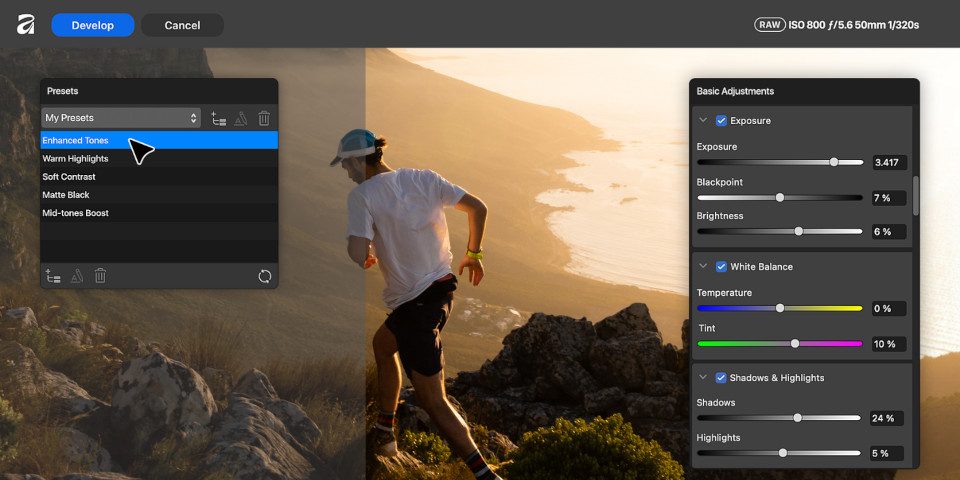
Image editing: new Mask and Deform tools
Affinity 3.3 is the first update to the software since April, and it’s undoubtedly the biggest since the free edition was originally released.
New features in the image-editing toolset include the Mask Tool, which automatically creates and paints on a mask as you brush or apply a gradient.
A new Deform Tool makes it possible to distort parts of an image – right up to reposing characters in photos by adding bone-chains of connected points to repose limbs.
For color correction, the release adds a new spline-based Saturation/Hue Curves Adjustment, and new color pickers for Curves Adjustment.
Workflow improvements include better stabilization of freehand strokes in the Paint Brush and Erase tools.
Affinity also becomes the latest CG application to support OCIO 2.5 (OpenColorIO 2.5), the latest version of the color-management standard.
Photography: new RAW development options, and an Astrophotography workspace
Photographers get a new options for developing RAW images, with RAW development presets now available globally, not per-document.
There are also new Multi Band and High Pass edge sharpening options, and Channel Inversion for tonal values, including Infrared and Negative options.
And while it’s outside the scope of what we cover on CG Channel, there is now a dedicated Astrophotography Studio workspace.
Vector design: new Blend Tool creates fluid transitions between vector forms
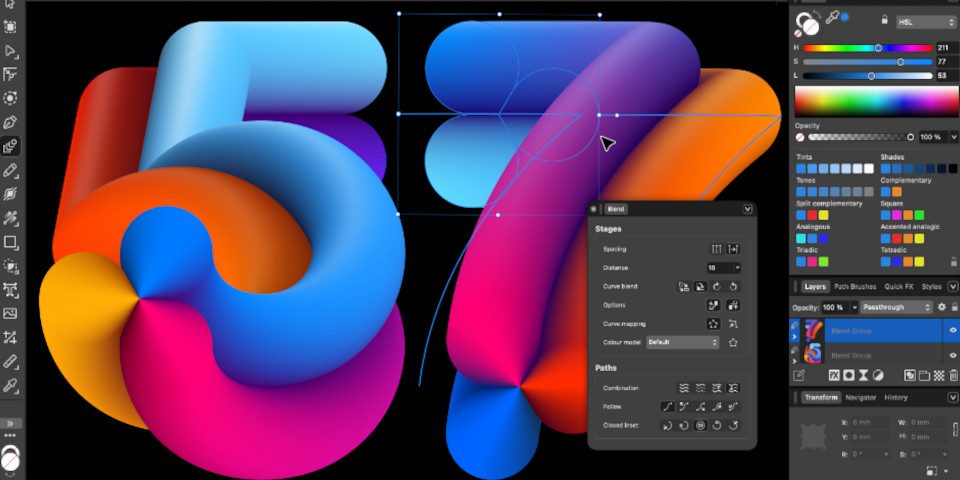
In the vector design toolset, the biggest new feature is the Blend Tool, which takes two or more ‘objects’ – geometric shapes and open or closed curves – and transitions between them, gradually blending their shape, color, opacity, size, and position.
The Blend groups remain live, making it possible to edit each component non-destructively, or even to add new objects to the blend.
Suggested use cases range from creating dimensional lettering and wordmarks, as in the image above, to decorative motifs and patterns.
Vector design: visualize G2 curve energy to troubleshoot curve forms
It is also now possible to show G2 curve energy on the Pen and Node tool.
It creates a visualization of the rate at which the radius of curvature varies along the curve, helping to find and fix abrupt transitions.
The feature is aimed at use cases that require very precise curves, like font and logo design, or even 2D product and industrial design workflows.
There are also updates to Gradient Fills, including a new Diffusion gradient type and pigment blending for Mesh fills.
Page layout: import INDD files from Adobe InDesign
The release also features a lot of updates to Affinity’s page layout tools. Page layout is outside what we cover on CG Channel, but you can find details in the release notes.
However, one significant change is support for INDD files, making it possible to import documents from Adobe InDesign directly, without using a third-party converter.
Scripting: automate repetitive tasks with JavaScript
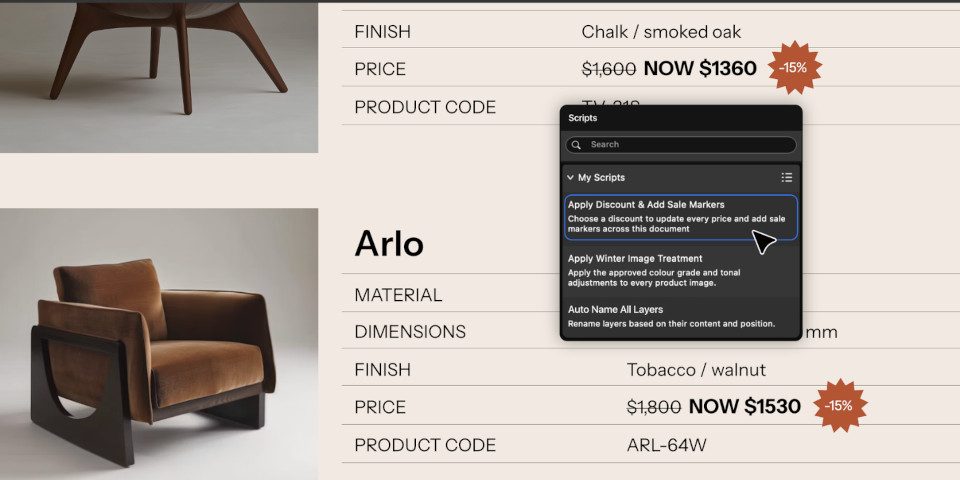
Another major new feature in Affinity 3.3 is the Scripting Studio: a dedicated workspace for writing – or AI-generating – JavaScript.
Scripting is primarily intended for automating repetitive tasks: it isn’t capable of adding new tools to the software, or modifying the functionality of existing ones.
However, the same script can be run across the Pixel, Vector and Layout studios, making it possible to automate changes to every part of a document.

Canva AI: new image upscaling and processing features
But for CG Channel readers, the most relevant changes may actually be the new AI models available with paid subscriptions.
There are two types: those that run locally on a user’s machine, and those that run in the cloud.
The former includes a lot of general-purpose image-processing models, including noise reduction, motion blur reduction, mixed light correction, and SDR-to-HDR conversion.
There is even an automated Object Detection and Region Detection, which automatically detects and masks all of the content of a particular type in an image – for example, foliage.
The latter includes AI image upscaling and image decomposition, which splits a flattened image into a set of editable layers.
New generative AI features include Layer to 3D, which generates a textured 3D model based on the content of any layer in a document – a raster image, vector design, or text.
The model is placed into the document as a 3D object, and can be rotated or repositioned.
Price and system requirements
Affinity 3.3 is available for Windows and macOS. The core application is free. To download it, you will need to register for a free online account.
To use Canva’s AI tools inside Affinity, you need a paid Canva subscription. Pro subscriptions cost $144/year and Business subscriptions cost $250/year.
Read a full list of new features in Affinity in the online release notes
Download the new Affinity software
Have your say on this story by following CG Channel on Facebook, Instagram and X (formerly Twitter). As well as being able to comment on stories, followers of our social media accounts can see videos we don’t post on the site itself, including making-ofs for the latest VFX movies, animations, games cinematics and motion graphics projects.