
ArcBrush 1.5 is an interesting $49 node-based image editor
Motion designer and Meta Reality Labs Creative Director Albert Omoss has released ArcBrush 1.5, a major update to his interesting node-based image editor.
The cross-platform desktop app, created as an alternative to Photoshop, was initially aimed primarily at game artists, concept artists, illustrators, and designers.
Version 1.5 introduces a new 32-bit image processing pipeline and features geared towards VFX and motion graphics pipelines, including new Compositing nodes and Cryptomatte support.
The update also moves the software away from its initial licensing model – free, but with credit-based charges for use of AI tools – to an all-inclusive perpetual license.
A simple alternative to Photoshop or Substance 3D Designer
Omoss describes ArcBrush as a “Photoshop alternative”, but since it’s node-based, another comparison familiar to CG Channel readers would be Substance 3D Designer.
The software makes it possible to edit 2D images by wiring together nodes in a graph.
The initial release, which came out earlier this year, featured 75 nodes, for transforming source images, adjusting their colors, color keying, and modifying the results with masks.
There are also more specialist nodes for processing textures, including converting images to normal maps, and for pixel art, including pixelating images and packing them as a sprite sheet.
Non-destructive, GPU-accelerated, and compatible with standard art pipelines
Workflow is non-destructive, and there important basic quality-of-life features for organizing and navigating the node graph, including a minimap, node search, and sticky notes.
It’s a native desktop application, which should improve performance, and it’s GPU-accelerated via OpenGL and OpenCV, so it should support any manufacturer’s hardware.
For pipeline integration, you can import and export images is standard bitmap and vector formats, including PNG, JPEG, WebP, TGA, BMP and SVG, and – as of ArcBrush 1.5 – OpenEXR.
ArcBrush also supports the palette file formats of common image editors, including Adobe .ase files and GIMP .gpl files.
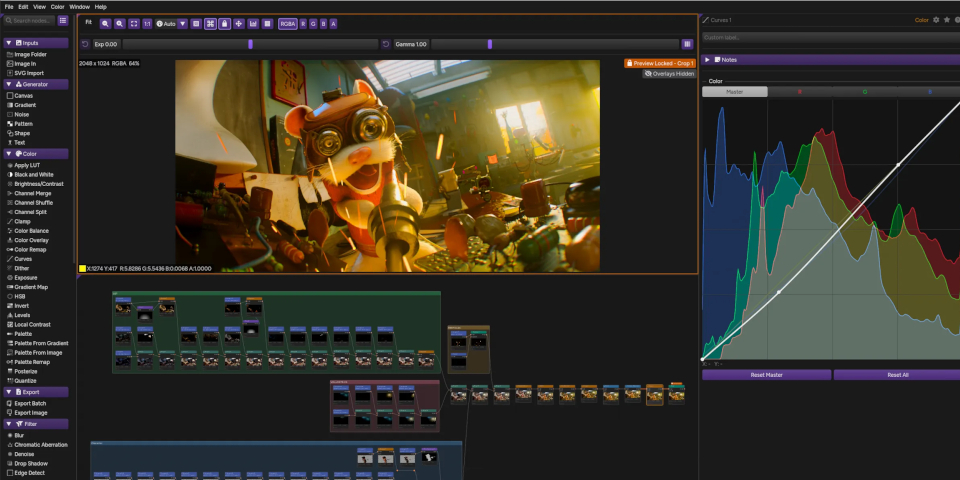
ArcBrush 1.5: new 32-bit mode, Cryptomatte support and Composite nodes
To that initial feature set, ArcBrush 1.5 introduces a range of new features important to professional graphics workflows – and new professional pricing.
The key change is a new 32-bit mode, making it possible to work end-to-end in 32-bit float color depth, preserving HDR values.
It supports a range of working color spaces, including linear, sRGB, ACEScg, ACEScct, and P3-D65; display transforms including the ACES views and AgX; and OCIO color management.
Users can import and export both 16-bit (PNG, TIFF, EXR) and 32-bit (TIFF and EXR only) files, with support for multi-part and tiled EXRs.
There are also new nodes geared towards VFX and motion graphics, including Cryptomatte, a new set of Composite nodes (Merge, Premult, Unmpremult, Despill, Clamp) and Apply LUT.
Now available via a $49 perpetual license, rather than being funded by pay-per-use AI tools
The release also changes the pricing model for ArcBrush.
The core software was previously free, even for commercial use, with users instead paying to use nodes integrating third-party AI models into the software on a par-use basis.
With version 1.5, many of the AI nodes have gone – there are still cloud-based upscaling and background removal features, but they’re free within a monthly usage cap if you have an ArcBrush account.
You can still use the software free, but only for personal work, and only in the old 8-bit mode. Instead, indie artists and studios pay a one-time fee of $49 for the new Pro license.
While the fact that the free version is no longer licensed for commercial use will put some people off, we suspect that many artists will actually welcome the changes, given the reduced focus on generative AI, and the relatively low cost of a perpetual license.
Price and system requirements
ArcBrush 1.5 is compatible with Windows 10+, Ubuntu 22.04+/glibc 2.35+ Linux and macOS 12.0+. The software is free for non-commercial use, but the free download is limited to 8-bit workflow.
Perpetual licenses of the Pro edition, for users with revenue under $250,000/year, cost $49. Studio licences are available rental-only, and cost $99/year.
Read more about node-based image editor ArcBrush from the product website
Read more about ArcBrush in the online documentation
Have your say on this story by following CG Channel on Facebook, Instagram and X (formerly Twitter). As well as being able to comment on stories, followers of our social media accounts can see videos we don’t post on the site itself, including making-ofs for the latest VFX movies, animations, games cinematics and motion graphics projects.