
Chaos releases V-Ray 7.4 for Blender

Chaos has released V-Ray 7.4 for Blender (V-Ray for Blender, Update 4), the latest update to the new version of the renderer for Blender.
New features include a Quick Sun Caustics system for adding fast-rendering caustic lighting effects to scenes, and an integration to Veras, Chaos’s architectural AI software.
The update also introduces a new tool for converting Cycles lights to V-Ray lights, support for Blender’s Holdout shader in V-Ray, and support for UDIMs.
A new edition of V-Ray integrated directly inside Blender
Released last year, V-Ray 7 for Blender makes it possible for Blender users to render with V-Ray from the current version of the open-source 3D software.
Unlike the legacy plugin, which exported scenes to V-Ray Standalone, it integrates V-Ray directly inside Blender, with V-Ray available for interactive rendering in the 3D viewport.
Since then, Chaos has also released the free V-Ray for Blender Community Edition, which can be used on commercial projects, with some workflow restrictions.
Support for more native Blender features, particularly for lighting and compositing
Although there are entirely new features in V-Ray 7.4 for Blender, perhaps the most significant thing about the update is the way it tightens integration between the two apps.
Key changes include a new Convert Lights tool (shown above), for automatically converting lights from Blender’s Cycles renderer to V-Ray lights.
The Blender edition also now supports unit conversions for VRayLight light types, and the VRayLightingAnalysis render element.
For compositing workflows, V-Ray for Blender now supports Blender’s Holdout shader.
Other changes include support for animated image sequences in the V-Ray Bitmap node, and support for the UDIM UV layout format.
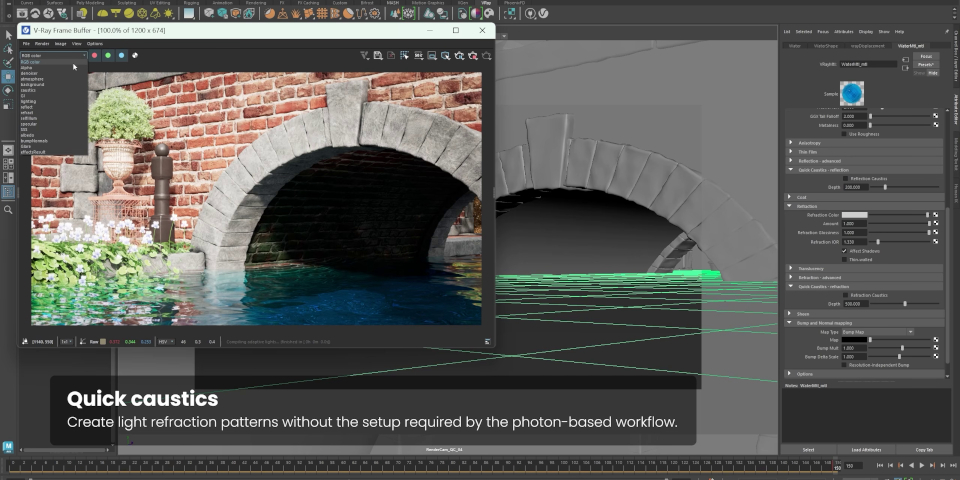
The new quick caustics system, shown inside the Maya edition of V-Ray.
New Quick Sun Caustics system and integration to generative AI tool Veras
Entirely new features – those that are new not just to V-Ray for Blender, but to V-Ray itself – include the Quick Sun Caustics settings in VRayMtl.
As the name suggests, they generate caustic lighting effects – for example, in underwater scenes – faster than normal V-Ray caustics. The results are less accurate, but good enough for “simple scenes”.
Chaos has also integrated Veras, the architectural AI visualization tool it acquired last year, with V-Ray for Blender.
The integration makes it possible to use a Blender scene – either a viewport screenshot, or a final-quality render – as the basis for generating an AI image inside Veras.
Support for relighting Gaussian Splats and live link to Vantage ‘coming soon’
Chaos has also just published a blog post covering the new features in V-Ray 7.4 across its Media and Entertainment products: the 3ds Max, Blender, Houdini and Maya editions.
Not all of them have made their way into V-Ray for Blender yet: major features listed as “coming soon” to Blender include support for relighting Gaussian splats inside the renderer, and a live link to Vantage, Chaos’s real-time ray tracing renderer.
Price, system requirements and release dates
V-Ray 7.4 for Blender is compatible with Blender 4.5+ on Windows 10+, Linux and macOS 11.0+. It supports GPU rendering with AMD, Apple Silicon and NVIDIA GPUs.
The V-Ray for Blender Community Edition is free, with some resolution and feature limitations.
Full V-Ray for Blender subscriptions include a named-user license of V-Ray for Blender, the Chaos Cosmos asset library and Chaos Cloud rendering, and cost $33/month or $199/year.
V-Ray for Blender is also available through standard V-Ray subscriptions, which provide access to all of the other current V-Ray integrations, plus a range of other tools and services.
Read a list of new features in V-Ray 7.4 for Blender in the online documentation
Have your say on this story by following CG Channel on Facebook, Instagram and X (formerly Twitter). As well as being able to comment on stories, followers of our social media accounts can see videos we don’t post on the site itself, including making-ofs for the latest VFX movies, animations, games cinematics and motion graphics projects.