
LightWave Digital releases LightWave 2026
Originally posted on 4 May 2026 for the preview, and updated for the stable release.
LightWave Digital has released LightWave 2026, the next major version of the veteran 3D animation and rendering software for VFX, motion graphics and visualization work.
It’s a wide-ranging update, introducing major new features including a new physics-based scene layout system, a vehicle rigging toolset, and complete new 2D and 3D tracking systems.
VFX artists get new features for creating destruction, lighting and snow effects, plus a new spectral ocean surface generator.
Architectural artists get support for parallax shading and a new ivy generator.
There are also updates to LightWave’s 3D modeling toolset, to viewport rendering and the bundled OctaneRender for LightWave renderer, and a new built-in asset browser.
The fourth annual update released by LightWave’s new development team
The release will be the fourth major update put out by LightWave Digital, a team of LightWave veterans, which acquired the software from its previous owner Vizrt in 2023.
The acquisition rescued LightWave from three years of stagnation, after Vizrt ended development in 2020.
The software is used across a range of industries, including illustration, visualization and VFX, with recent projects including The Conjuring: Last Rites and Percy Jackson and the Olympians.
3D modeling and UV editing: new Advanced Bevel and UV Serpent tools
Although the headline features in LightWave 2026 are the new rigging and effects systems – about which, more later – the update introduces a number of new modeling features.
Advanced Bevel (shown above) extends the standard bevel available in Modeler, LightWave’s 3D modeling application, providing a Bézier curve editor for the curve profile.
There is also a new Fillet tool for rounding corners on planar geometry.
A new Surface Wrap modifier wraps an object around a target surface: for example, a label around a bottle.
New UV tools include UV Serpent, a new Modeler plugin for generating UV maps for curved polygon strips including “pipes, roads, tracks, ribbons, snakes, tentacles [or] ropes”.
LightWave’s atlas mapping functionality has also been updated, with Atlas UV preserving the scale of UV islands and packing them more efficiently than the legacy system.
Updated 23 June 2026: The online documentation for LightWave 2026 is now live, and also shows new dedicated tools for modeling pipes, cables and scaffolding.
Scene layout: new Advanced Placement system for physics-based object scattering
For scene layout, LightWave 2026 introduces Advanced Placement (AP), a physics-based system for scattering objects into a 3D scene in real time and having them settle under gravity.
Although other DCC applications have similar functionality, an interesting feature of AP is that objects can be made to shatter automatically on contact with the ground.
The results can be rendered in real time in RiPR, LightWave’s new path traced viewport preview, or baked for offline rendering.
RiPR itself also gets an update, with RiPR 2 adding support for mesh-based lighting, tangent space normal mapping, and temporal denoising via NVIDIA’s OptiX denoiser.
Rigging and animation: MotoRig creates sophisticated vehicle rigs
Major new features include MotoRig, a semi-automated vehicle rigging system.
It creates animation rigs for vehicle models, with users able to adjust the results via parameters for properties like mass, weight distribution and banking control.
It looks a pretty granular system, with support for anything from basic terrain following to “advanced suspension dynamics”, with presets for six different types of shock absorber.
As well as standard four-wheel vehicles, MotoRig can be used on six- or eight-wheel military vehicles.
VFX: new Fracture tool for destruction simulations
Visual effects and motion graphics artists get new options for creating a range of effects.
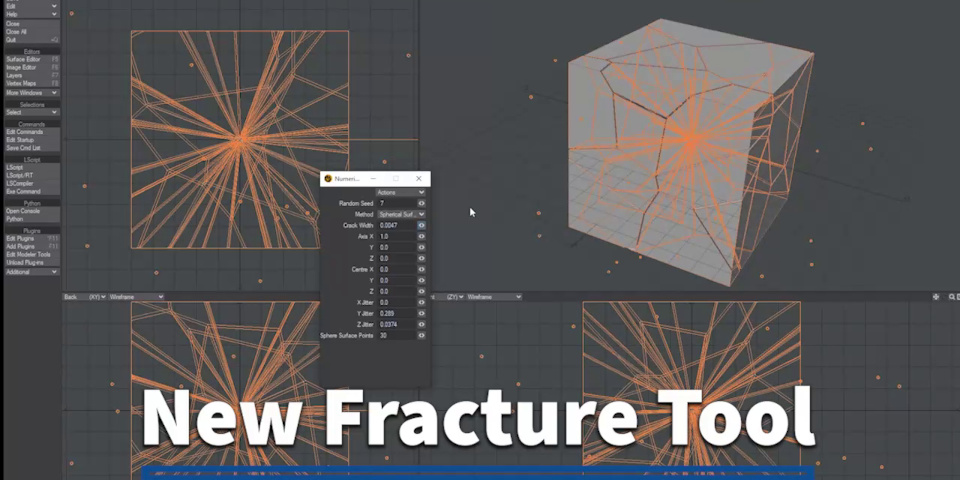
Of them, the Fracture tool is the most conventional, pre-fracturing geometry for destruction simulations, in the same way as the equivalent toolsets in Maya or Houdini, or plugins like Pulldownit.
It works in real time, at least on relatively simple meshes, preserves materials and UVs, and supports a range of distribution patterns for the resulting shards.
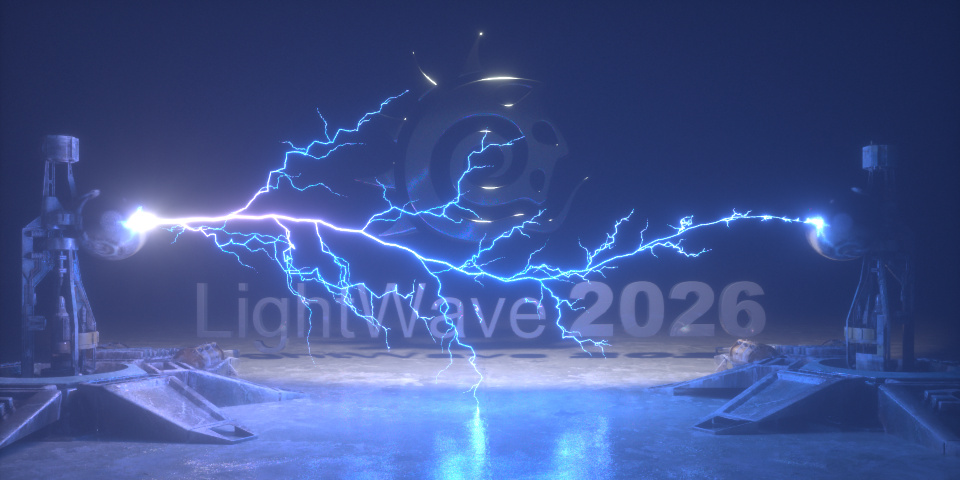
VFX: THOR generates procedural lightning bolts as 3D geometry
Other, more unusual new VFX features include THOR, a “powerful object replacement plugin” for creating procedural lighting arcs between two objects in a 3D scene.
The lightning is generated as actual 3D geometry, with automatic thickness and heat weight maps for more precise control over the materials applied.
There are options to generate individual bolts, forked lighting or recursive branching, and the key parameters are animatable, to control how the lighting grows over time.
VFX: Snow Falling 3D adds snow and rain effects to shots
VFX artists also get Snow Falling 3D, a “sophisticated mesh deformer plugin” for creating snow and rain effects faster – and faster to render – than with standard particles.
It generates snow only within a user-controlled volume or the shot camera’s field of view, with users able to replace the base particles with meshes or VDBs via instancing.
The snow can be affected by a range of effectors, including gravity, wind, updrift and turbulence, comes with a “rich” set of vertex maps for rendering, and supports motion blur.
VFX: new spectral ocean surface generator
Other new effects features in LightWave 2026 include Ocean Spectrum Controller, a new plugin for building animated water surfaces.
There are three spectral types for generating the base wave pattern, including a classic Tessendorf distribution, and specialist spectra for wind-driven waves and coastal conditions.
Finer ripples and highlights are handled by a micro bump shader.
The results can also be tuned using weight maps to represent wind direction, water depth, distance falloff, and to attach the simulation to moving boats.
Architectural visualization: parallax shading creates the illusion of rooms behind windows
Architectural artists get support for parallax shading, to enable a 2D texture mapped to a window on the exterior facade of a building to give the illusion of a 3D interior behind it.
Similar functionality is available in architectural renderers like V-Ray and Twinmotion.
In LightWave, the parallax shader is compatible with both the native render engine and OctaneRender, with a dedicated Window node controlling the atlas maps it uses.
Architectural visualization: new ivy and cobweb generators
Visualization artists also get a new ivy generator, of the type available in a range of other DCC applications.
It grows climbing plants like ivy procedurally across any surface in a 3D scene, with the growth pattern influenced by controls for gravity, surface adhesion and randomness.
More unusually, the update also introduces SpiderWeb, which does a similar job for cobwebs.
The webs are generated as 3D geometry, not as post effects, and there are options for chaotic and spiral webs.
Tracking: new 3D camera tracker and 2D pixel tracker
LightWave 2026 also introduces two new tracking toolsets, making it possible to do simple matchmoving work natively inside LightWave, rather than having to use dedicated software.
3D Camera Tracker is a plugin for LightWave’s Layout application that performs 3D camera tracking using the open-source COLMAP pipeline.
It reconstructs the motion of a real-world camera in a video clip or image sequence, reconstructs it in 3D space, and imports the results into LightWave as an animated camera.
The 3D geometry of the tracked scene can be reconstructed as sparse or dense point clouds, or 3D meshes.
For 2D tracking, the Motion Pixel Tracker is a native LightWave tool that tracks 2D features in background image sequences and creates animated null objects that follow the tracked points.
Workflow: new LightWave asset browser
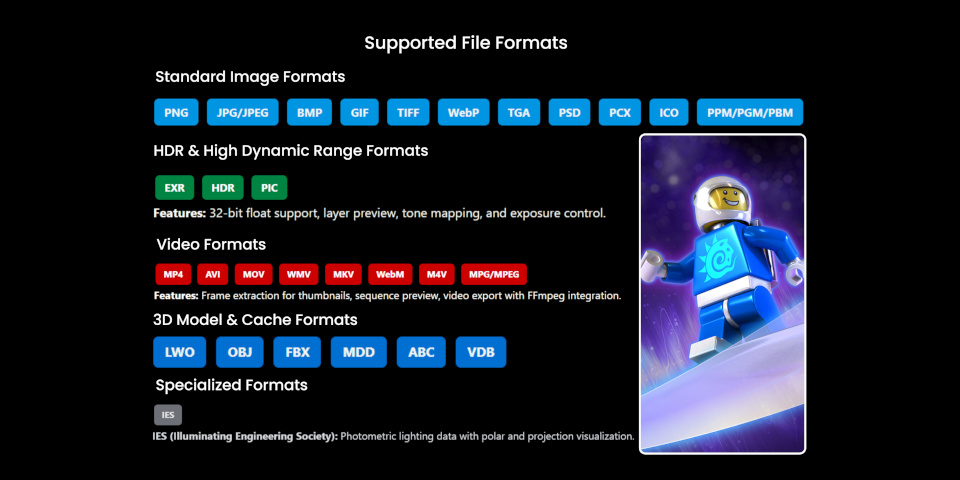
Workflow improvements include a new built-in asset browser for viewing and organizing assets, including 3D models, images, videos, HDRIs and IES lighting data.
It includes integrations with key third-party asset libraries, including Quixel Megascans and Maxtree libraries.
OctaneRender for LightWave: support for 3D Gaussian Splats, meshlets and virtual textures
OctaneRender for LightWave, the LightWave integration for GPU renderer OctaneRender, now bundled with the software, has also been updated.
The LightWave integration now supports some of the major features introduced in the OctaneRender 2026 releases, including 3D Gaussian Splatting.
Gaussian Splats rendered in OctaneRender can now be previewed in Layout.
OctaneRender for LightWave also now supports meshlets and virtual textures, OctaneRender’s new render-time geometry- and texture-streaming systems.
Other changes include support for color-management standard OpenColorIO (OCIO), for OctaneRender’s analytical and directional lights, and many more of its gradient nodes and procedural generators.
Price, system requirements and release date
LightWave 2026 is compatible with Windows 10+ and macOS 14.1+. New licenses cost £795 (around $1,070).
Read an overview of the latest features in LightWave 2026 on the product website
Read more about the new features in LightWave 2026 in the online documentation
Have your say on this story by following CG Channel on Facebook, Instagram and X (formerly Twitter). As well as being able to comment on stories, followers of our social media accounts can see videos we don’t post on the site itself, including making-ofs for the latest VFX movies, animations, games cinematics and motion graphics projects.