
Adobe releases Photoshop 27.10
Adobe has released Photoshop 27.10, the latest version of the image-editing software, used in the entertainment industry for concept art, texture editing, and retouching renders.
The release introduces new prompt-based editing workflows, including a complete AI Assisted Editor mode (shown above) and a Prompt to edit option in the standard contextual task bar.
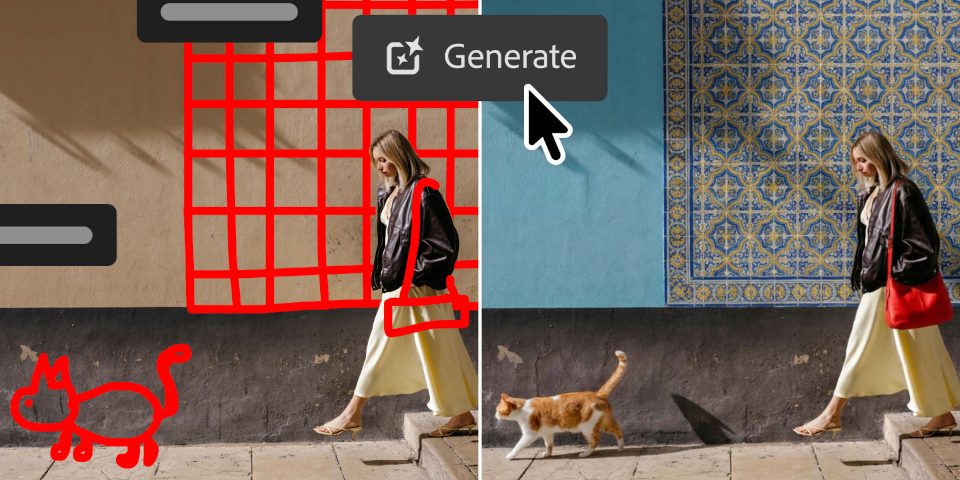
The edits can be made using Photoshop’s existing AI tools, and controlled using masks or even visual markup.
Non-AI-related changes include a new Light Adjustment Layer, updates to the Dynamic Text tool, and the option to browse Adobe Stock content directly in Photoshop.
New AI Assisted Editor provides a ‘simplified, AI-powered’ editing workflow
Photoshop 27.10 brings prompt-based image editing to the software, in the shape of the AI Assisted Editor: a new, simplified AI-powered editing mode.
Available as an alternative to the Pro Editor – Photoshop’s standard manual editing mode – it makes it possible to perform edits on images using natural-language commands.
It seems to be primarily for making edits using Photoshop’s existing generative AI tools, including Generative Fill, Generative Expand, Generative Upscale, and Remove Background.
Workflow is non-destructive: layered documents are flattened when switching from the Pro Editor to the AI Assisted Editor; then, on switching back, the edit is added as a new layer.
Adobe describes the AI Assisted Editor as a beta feature, although it seems to be available in the stable version of the software, not the separate beta builds available to subscribers.
We’ve contacted Adobe for more details, and will update if we hear back.
New Text to prompt option also brings prompt-based edits to the standard editor
The standard Pro Editor mode also gets new prompt-based workflows, in the shape of Prompt to edit, a new option in the contextual taskbar.
Like the AI Assisted Editor, it makes it possible to describe edits to an image in natural language, and have Photoshop choose an appropriate tool automatically.
As well as obviously AI-based edits, like changing a character’s pose, or adding rain and puddles to a scene, that includes more conventional edits like adjusting brightness or contrast.
Control AI edits with masks or visual markup
There are also new features intended to make AI-powered edits more precise.
First, it is possible to use masks to control where generative edits are applied, rather than having to describe the region of the image in words.
The functionality is available when using Adobe’s own Firefly Image Model 5.
Second, it is possible to use visual markup to control an edit, in the same way that you might in shot review or collaborative editing software.
Users can draw “arrows, circles … and rough doodles” on an image – for example, drawing rough shapes to control placement of AI-generated objects – or add text-based notes.
The functionality is available when using one of Google’s Gemini AI models, available as partner models in Adobe software.
Non-AI-based features: new Light Adjustment layer, and updates to Dynamic Text
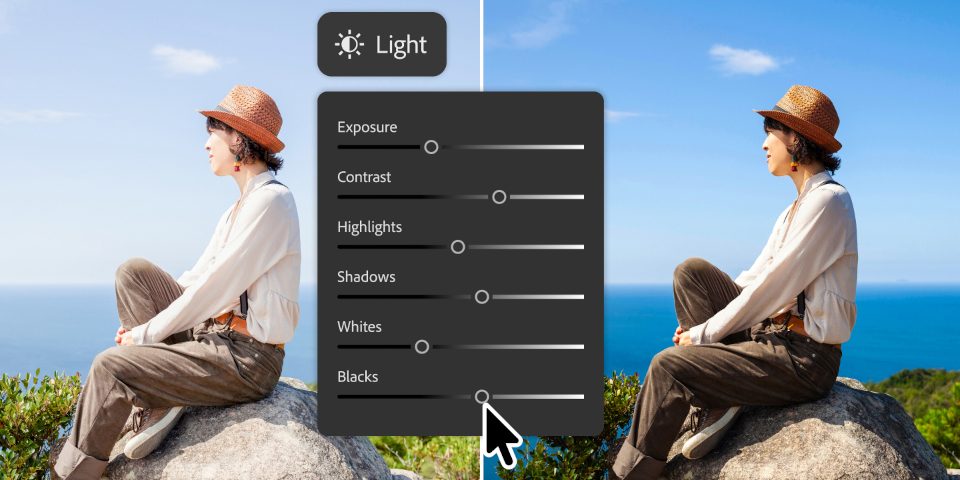
Outside the AI tools, users get a new Light Adjustment Layer.
It makes it possible to adjust the lighting of an image – exposure, contrast, highlights, shadows, whites and blacks – non-destructively, using the standard Adjustment Layer workflow.
The Dynamic Text tool can now flow text along any shape or path, rather than only around circular and semicircular paths, as in previous releases.
Workflow improvements include the option to customize the file formats available from the Save As command, and to browse and place Adobe Stock content directly within Photoshop.
Performance has also been improved on Zen 4 and Zen 5 processors – roughly speaking, AMD CPUs less than four years old – although the release notes don’t put figure on the speed boost.
Price and system requirements
Photoshop 27.10 is compatible with Windows 10+ and macOS 14.0+. In the online documentation, it is also referred to as the August 2026 release.
The software is rental-only, with Photography subscription plans that include access to Photoshop costing $29.99/month or $239.88/year.
Single-app Photoshop subscriptions cost $34.49/month or $263.88/year.
Read Adobe’s release notes for Photoshop 27.10
Have your say on this story by following CG Channel on Facebook, Instagram and X (formerly Twitter). As well as being able to comment on stories, followers of our social media accounts can see videos we don’t post on the site itself, including making-ofs for the latest VFX movies, animations, games cinematics and motion graphics projects.