
Sketchbook releases Sketchbook Pro 9.4
The new Lasso Fill in Sketchbook Pro 9.4, the latest version of the pro digital sketching software.
Sketchbook has released Sketchbook Pro 9.4, the latest version of the veteran digital sketching software, adding new Lasso Fill and Draw Outline tools.
The features are also available in the latest version of the mobile edition, Sketchbook 6.2.5.
One of the original digital sketching tools for design, concept art and illustration
Sketchbook is one of the longest-established digital sketching tools, having originally been released in the 1990s for automotive concept design work.
Over the years, it has gone through a series of owners, but is currently developed by independent firm Sketchbook Inc, which took it over from Autodesk in 2021.
Although it’s a deliberately streamlined tool, it’s one capable of professional-quality work, with hundreds of brush types mimicking real-world paintbrushes, pencils, markers and erasers.
Supporting features include guides, rulers and stroke tools, plus a full layer system.
It is currently available as both a desktop application, Sketchbook Pro, for Windows and macOS, and as a free mobile edition, simply called Sketchbook, for Android and iOS.
Updated gradually throughout the Sketchbook Pro 9.x releases
Although we haven’t covered Sketchbook Pro on CG Channel since Sketchbook took over its development, the firm has been gradually putting out updates to the software.
In 2022, Sketchbook Pro 9 introduced a revamped color editor and support for custom color palettes, and in 2024, Sketchbook Pro 9.1 added support for clipping masks.
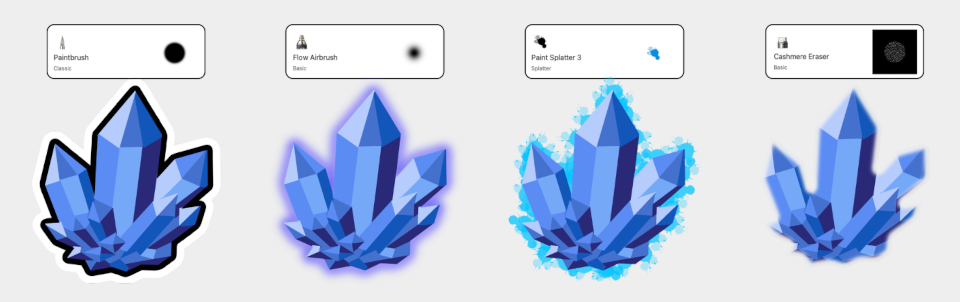
Sketchbook Pro 9.4: new Lasso Fill and Draw Outline tools
To that, Sketchbook Pro 9.4 adds two major new features, Lasso Fill and Draw Outline.
Lasso Fill automatically fills lasso-selected areas of an image with solid colors, and is described as a “great way to block out silhouette shapes”.
Draw Outline automatically applies a stroke to the current selection, using the color and settings of the active brush.
That makes it possible to create a range of effects beyond simple outlines, with airbrushes creating background glow effects, and erasers generating soft edges.
Also available in the Premium Bundle for the mobile editions
Both features are also available in Sketchbook 6.2.5, the latest version of the mobile app, although only if you have the paid-for Premium Bundle add-on.
The free base app gets a number of workflow improvements, including the ability to reorder palettes in the Color Editor, and to Cut, Copy and Paste from the selection sub-toolbar.
Price and system requirements
Sketchbook Pro 9.4 is compatible with Windows 10+ and macOS 12.0+. It costs $24.99.
Sketchbook 6.2.5 is compatible with Android and iOS 14.0+. The base app is free; the Premium Bundle, which unlocks advanced features, costs $2.99.
Read an overview of the new features in Sketchbook Pro 9.4 on the Sketchbook blog
Read a full list of new features in the online release notes
Have your say on this story by following CG Channel on Facebook, Instagram and X (formerly Twitter). As well as being able to comment on stories, followers of our social media accounts can see videos we don’t post on the site itself, including making-ofs for the latest VFX movies, animations, games cinematics and motion graphics projects.