
Unity 6.3 LTS is out: see 5 key features for games artists
Unity has released Unity 6.3, the latest version of the game engine and real-time renderer.
As the latest Long Term Support release, a core focus of the update is simply to improve stability, but it introduces some significant new features in its own right.
Below, we’ve picked out five key changes for CG artists, as opposed to developers, from the option to create terrain shaders in the Shader Graph to a big step towards a unified renderer.
You can find a brief summary of the other new features at the end of the story.
1. Shader Graph: create custom terrain and lighting shaders without coding
The Shader Graph gets a number of new capabilities in Unity 6.3, but one of the biggest is the option to create terrain materials and shaders, for both the URP and HDRP render pipelines.
The functionality is intended enable artists with no coding experience to customize the look and behavior of Unity terrain, making it easier to resolve issues like tiling artifacts, visible material transitions, and the base terrain shader being expensive to render on mobile devices.
There is also new functionality for creating custom lighting and UI shaders, although only for the URP, and a number of workflow improvements: you can find a full list of changes here.
2. Lighting: pack lightmaps more efficiently with xAtlas
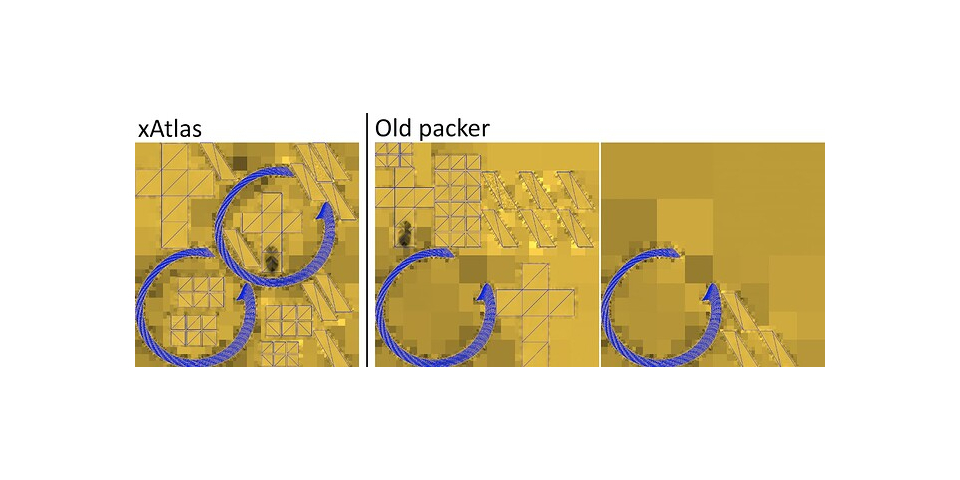
In the lighting system, the biggest change is xAtlas, the new packing algorithm for lightmaps.
Unity describes it as “generally slower” than the previous algorithm – still available as an option in the Lighting window – but capable of generating more tightly packed lightmaps, resulting in a saving in memory usage of up to 27% across a range of “representative test scenes”.
As the new algorithm is a stochastic packer, it is also possible to trade packing time against quality of output by changing the number of packing iterations that Unity performs.
In addition, OpenCL-based GPU Lightmapper is now the default light baking backend.
3. Rendering: render 3D as 2D to create new visual styles
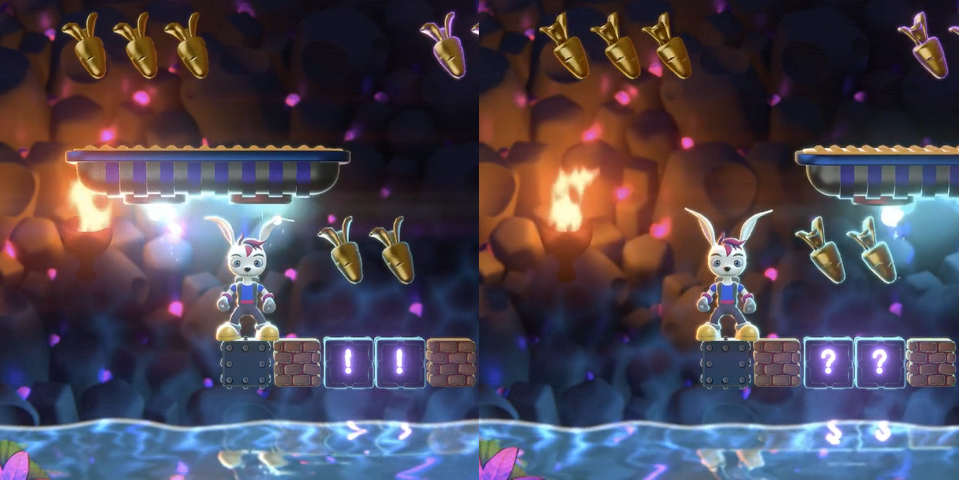
Another interesting graphical change in Unity 6.3 is the option to render 3D elements as 2D.
When using the 2D Universal Render Pipeline, the 2D Renderer now supports the rendering of 2D sprites in the same scene as 3D elements rendered with the Mesh Renderer and Skinned Mesh Renderer.
The 3D elements can receive lighting from 2D lights, interact with Sprite Masks, and be sorted with 2D sprites in Sorting Groups.
4. Shader Graph: a big step towards a single unified renderer to replace the URP and HDRP
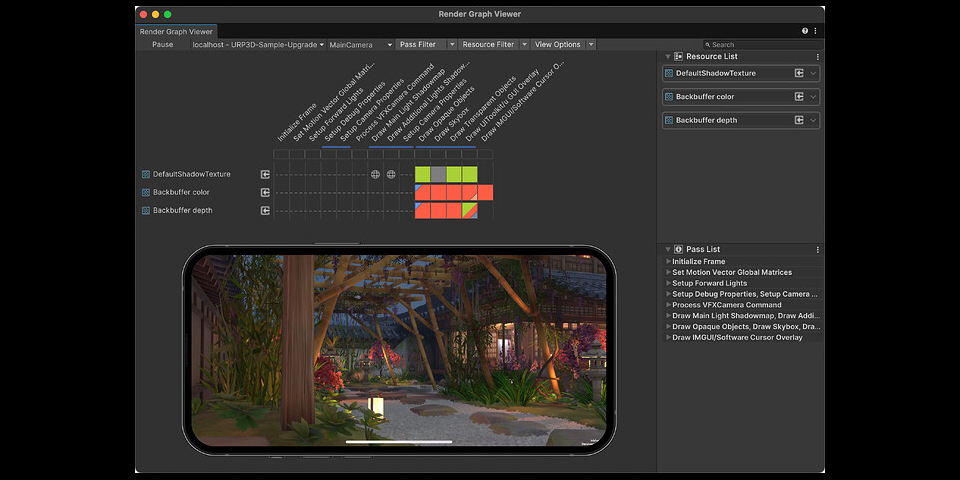
There are a lot of changes to the Render Graph in Unity 6.3, but one of the most significant is that the URP and HDRP now use the same underlying compiler and API.
That moves Unity a step closer to having a unified renderer for desktop and mobile platforms, which Unity announced as part of its product roadmap at last year’s Unite 2024 conference.
The Render Graph can also now generate a number of new utility passes, and there are changes intended to improve render performance optimization, including the option to connect the Render Graph Viewer to player builds running on mobile and XR platforms, as shown above.
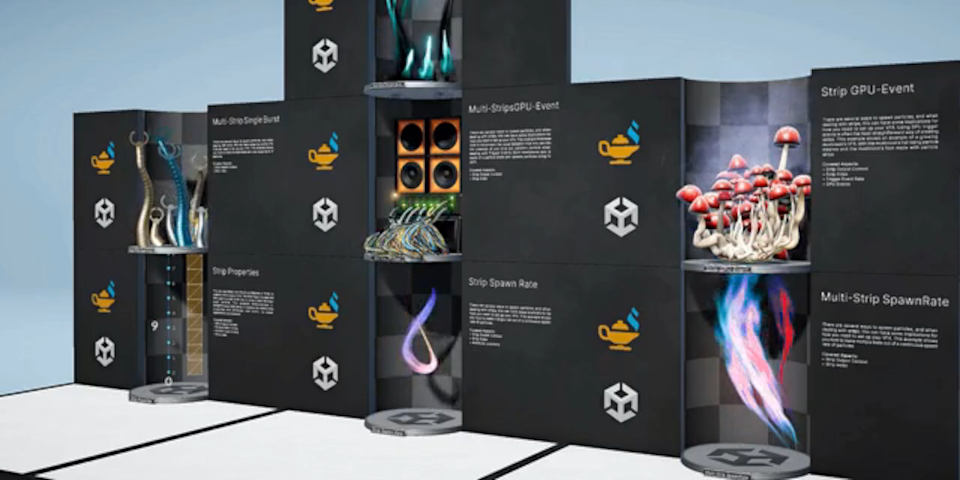
5. VFX Graph: smaller feature and workflow updates
The changes to the VFX Graph are smaller, although Unity’s blog post announcing the release has a passing mention of “instancing support for GPU events”.
Workflow improvements include new options when using Sticky Notes to comment a graph, including the option to group Sticky Notes together with nodes.
Updates to the UI Toolkit and physics system
For UI authoring, Unity 6.3 features a number of significant improvements to the UI Toolkit, including support for custom shaders and post-processing filters.
The Vector Graphics package is also now fully integrated in the UI Toolkit, making it possible to import vector images in SVG format without having to install a separate package.
There are also updates to the animation and physics systems, including new 2D physics APIs.
Performance optimization, Unity Building Blocks, and better Android XR support
For performance optimization, artists and developers get a Sprite Atlas Analyzer tool, and new Shader Build Settings make it possible to configure build properties without coding, reducing shader compilation times.
Developers get a number of workflow and performance improvements, plus a new set of Unity Building Blocks for adding readymade gameplay features to projects.
For AR and VR titles, support for Android XR, introduced in Unity 6.1, has been extended, and now supports face tracking and object tracking.
Price and system requirements
Unity 6.3 LTS is available now. The Unity Editor is compatible with Windows 10+, macOS 13.0+ and Ubuntu 22.04/24.04 Linux.
Free Personal subscriptions are now available for artists and small studios earning under $200,000/year, and include all of the core features.
Pro subscriptions, for mid-sized studios, cost $2,200/year. Enterprise subscriptions, for studios with revenue over $25 million/year, are priced on demand. Prices will rise in January 2026.
Read an overview of the new features in Unity 6.3 LTS on Unity’s blog
Read a full list of new features in Unity 6.3 LTS in the online documentation
Have your say on this story by following CG Channel on Facebook, Instagram and X (formerly Twitter). As well as being able to comment on stories, followers of our social media accounts can see videos we don’t post on the site itself, including making-ofs for the latest VFX movies, animations, games cinematics and motion graphics projects.