
Discover 5 (plus 5) key features for CG artists in Godot 4.6
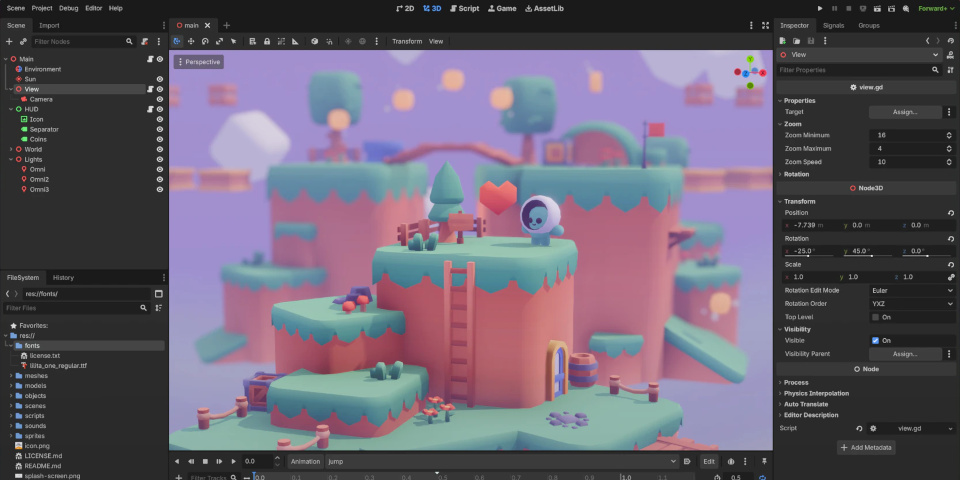
Godot 4.6 introduces a new Modern UI theme as default. Check out five new features for CG artists in the latest version of the game engine, plus five quality-of-life improvements.
The Godot team has released Godot 4.6, the latest version of the open-source game engine.
As usual, we’ve picked out five new features of particular significance to CG artists, as opposed to programmers, including updates to lighting, rendering, animation and physics.
But because the main theme of the release is to improve workflow, we’ve also picked out five key quality-of-life changes, from the new UI theme to changes to viewport selection.
At the end of the story, you can find a quick run-down of the other changes, including a nice bonus for DCC software developers that create tools based on Godot.
1. Rendering: faster, higher-quality Screen Space Reflections
Godot 4.6 overhauls the way that the engine handles Screen Space Reflection (SSR), used to display reflective materials like glass, water or polished metal.
As well as being a “significant leap” in visual quality and stability, the new system provides full- and half-resolution modes, making it possible to trade quality against performance.
You can find a lot of technical detail on the changes – which include rewriting the main SSR shader to use Hi-Z tracing – in the Godot GitHub repository.
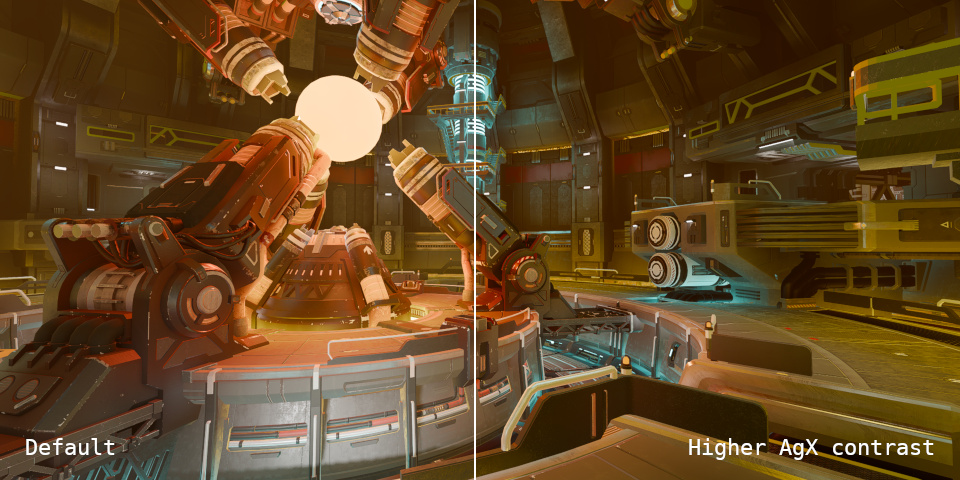
2. Lighting and rendering: better tonemapping and faster lightmaps
There are also improvements to tonemapping, with the AgX tonemapper now supportinng HDR output, and exposing controls for brightness and contrast.
In addition, glow is now blended before tonempapping, and Screen is the new default mode, which “improves visual results with at least similar or outright better performance”.
For lighting, reflection and radiance probes now use octahedral maps rather than cube maps, reducing GPU and memory usage, and making them more reliable across a range of hardware.
3. Animation: new modular IK framework
Godot 4.6 also reinstates Inverse Kinematics (IK), after it was removed in Godot 4.0, the major structural update rolled out in 2023.
The new modular IK framework includes deterministic solvers for two-bone IK systems and spline IK, plus a range of iterative solvers.
There are also new constraints to control the twist and angular velocity of joints, and the option set the target of constraints to 3D nodes: for example, to snap a character’s hand to a weapon.
4. Animation: workflow improvements
Animators also get several nice quality-of-life improvements, including the option to retime animations by dragging directly in the timeline, rather than having to enter numerical values.
There are also new visibility, lock, and delete buttons for node groups in the Bezier track editor.
5. Physics: better rigid body dynamics
For physics, Jolt – the rigid body dynamics library used in games like Death Stranding 2 and Horizon Forbidden West – becomes the default 3D physics engine.
Jolt was first integrated into Godot last year, but remained an experimental feature.
The update also simplifies the process of creating collision shapes, which can now be generated automatically for 3D primitives, like boxes, spheres, cylinders and capsules.
Five key quality-of-life features
Godot 4.6 also features a lot of quality-of-life improvements, making common workflows faster, or just more pleasant to carry out. These are five that particularly caught our eye.
1. New modern UI theme
An updated version of the Minimal theme, the new default UI theme improves readability and reduces visual clutter, while its grayscale background makes color-sensitive work easier.
2. The bottom UI panels are now moveable
Godot 4.6 unifies the docking system, making the bottom panels behave like regular docks. You can now drag them between the bottom and sides of the editor, and most can be floated.
3. Decoupled Select and Transform modes
When manipulating objects in the viewport, Select and Transform have now been decoupled, reducing the risk of accidental changes, and bringing workflow in line with most 3D software.
4. Live asset previews in the Quick Open dialog
Godot now displays in-scene previews of assets as you move over them in the Quick Open dialog, making it easier to select models, material, textures and UI elements.
5. Set keyboard shortcuts directly
It is now possible to define keyboard shortcuts directly in the Godot Editor’s settings, making the process much more straightforward, and avoiding the need for “hard-coded workarounds”.
Other key changes
Another important change in Godot 4.6 is that Direct3D 12 is now the default graphics API for Windows projects, not Vulkan.
According to the developers, “Vulkan support on Windows is giving us a lot of headaches, with GPU drivers often being poorly maintained compared to their Direct3D 12 counterparts”.
For Android development, it is possible to build projects using Gradle, making it possible to export apps that use Android plugins directly from the Android editor.
And for software developers, it is now possible to build Godot as a library, making it possible to embed directly into applications, rather than running it as a separate executable.
A number of CG tools are based on Godot, including Material Maker, often seen as an open-source alternative to Adobe’s Substance 3D software.
License and system requirements
Godot 4.6 is compatible with 32-bit and 64-bit Windows, and 64-bit Linux and macOS. There are also browser-based and Android ports of the Godot Editor.
The source code is available under a MIT license
Read a full list of new features in Godot 4.6 on the Godot team’s blog
Download Godot from the game engine’s website
Have your say on this story by following CG Channel on Facebook, Instagram and X (formerly Twitter). As well as being able to comment on stories, followers of our social media accounts can see videos we don’t post on the site itself, including making-ofs for the latest VFX movies, animations, games cinematics and motion graphics projects.