
Howler 2027 is out with new 3D rendering environment Howler 3D
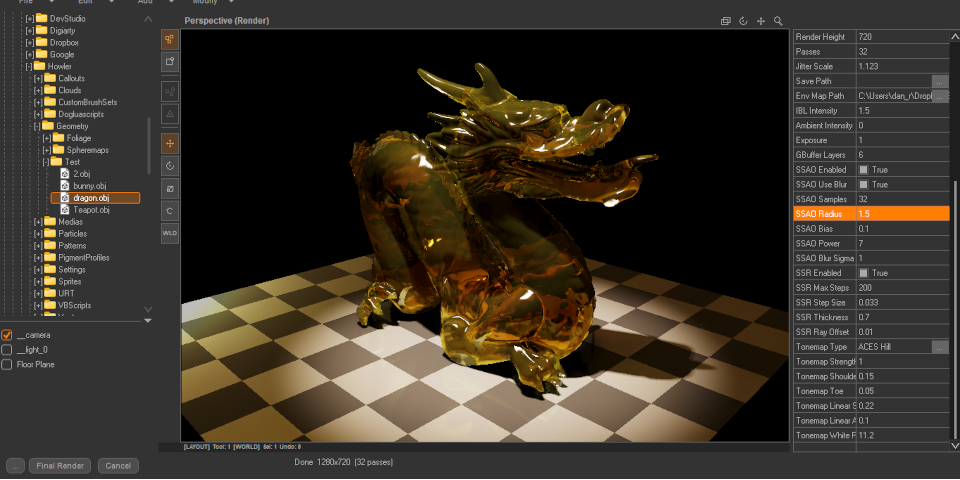
Developer Dan Ritchie has begun the Howler 2027 releases, the latest annual series of updates to the hard-to-classify digital painting, animation and video processing tool.
Howler 2027 itself introduces Howler 3D, a new 3D environment for importing, editing and rendering 3D models, plus an Outpaint Fill tool for removing objects from images.
An idiosyncratic low-cost natural media paint package with a lot of unexpected features
Originally released two decades ago, Howler – originally Project Dogwaffle – is an idiosyncratic sub-$100 digital painting and content creation tool.
Its core strength is natural media painting, but it also features basic 3D rendering capabilities, primarily for landscapes and foliage, and animation features including a timeline, onion skinning, frame repair, retiming, and an exposure sheet for lip sync animation.
Ritchie had originally intended to stop work on Howler last year, aiming to raise money to release the then-current 2025 version as freeware.
However, he has since decided to resume active development of the software.
Howler 3D: a new ‘adjacent’ 3D rendering environment
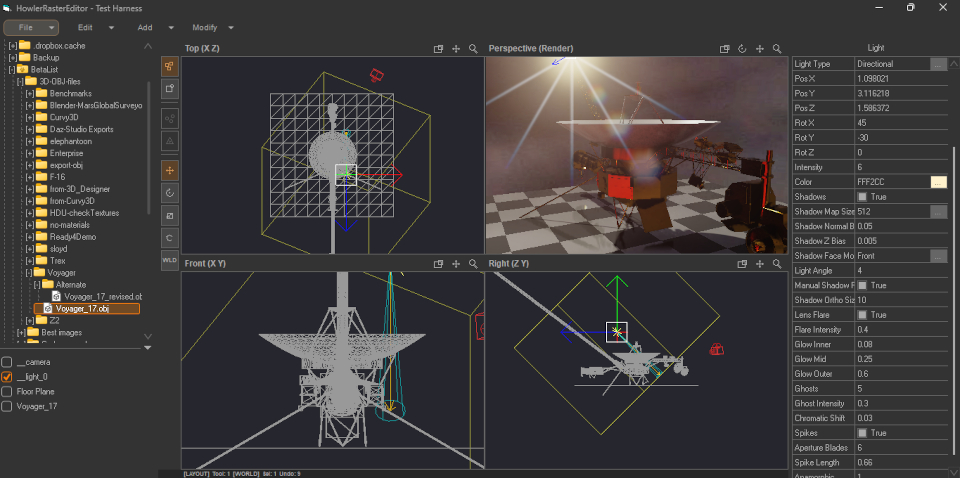
The main change in Howler 2027 is Howler 3D, a new 3D content creation and rendering environment.
Ritchie describes it as a “fully embedded 3D environment adjacent to Howler”: it’s technically a plugin, and is accessed from the Render menu, but can run entirely as a separate process.
Inside it, users can import, manipulate and render 3D models, with support for PBR materials, image-based lighting and physically based rendering.
There is currently little information about it on the Howler website, but you can find a list of key features, supplied by Dan Ritchie, pasted in at the foot of this story.
Ritchie also plans to add animation capabilities to Howler 3D in future.
The work builds on the new 3D tools introduced throughout the Howler 2026 releases, initially as separate web-based apps.
Other new features in Howler 2027: Outpaint Fill for object removal
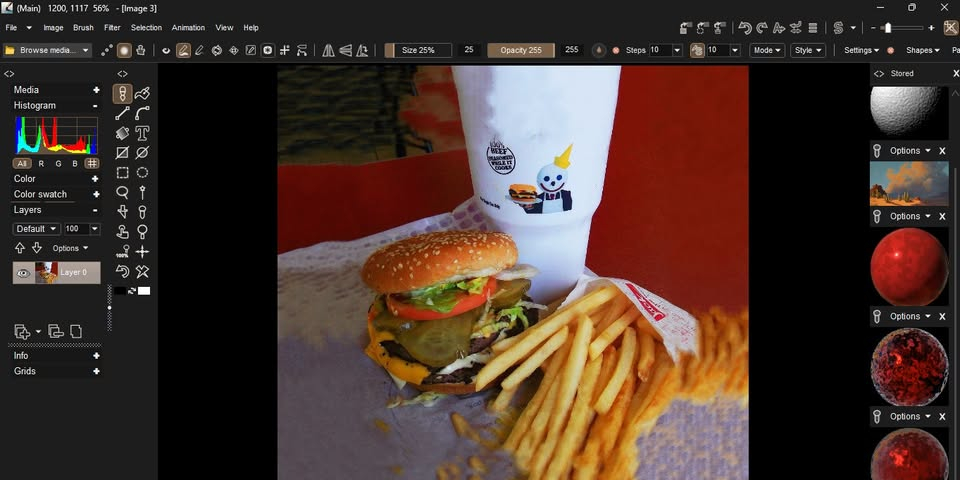
New features in Howler 2027 itself include an Outpaint Fill tool, shown above.
It works in a similar way to Content-Aware Fill in Photoshop, replacing selected parts of an image with automatically generated areas of background.
It looks a pretty quick-and-dirty solution: Ritchie describes it as “not perfect … but it will extend small areas in a convincing way for many problem types”.
Workflow improvements include new Canvas Creation and Animation Creation panels, and keyframes are now directly editable from the Timeline panel.
Price and system requirements
Howler 2027 is available for Windows only. It is officially still a pre-order, but anyone buying the software gets Howler 2027 immediately as a “generally stable build”.
The software has a MSRP of $56.99, but is rarely sold for full price: at the time of posting, it is available for $27.99.
Read a list of new features in Howler 2027
See more details of the new features in the PD Howler – Project Dogwaffle Facebook group
Have your say on this story by following CG Channel on Facebook, Instagram and X (formerly Twitter). As well as being able to comment on stories, followers of our social media accounts can see videos we don’t post on the site itself, including making-ofs for the latest VFX movies, animations, games cinematics and motion graphics projects.
Key features in Howler 3D
Core rendering features
• Shadows with point, spot, distance light types and manual projection modes
• Reflections (SSR hybrid pipeline)
• Refraction with thickness, IOR, and attenuation
• Ambient Occlusion (SSAO with temporal noise reduction)
• Global Illumination‑style accumulation via progressive multi‑pass rendering
• ACES tonemapping and exposure controls
Modeling and layout
• Import OBJ meshes with extended materials
• Scene layout tools for positioning, scaling, and orienting objects
• Grounding, centering, smoothing, lathe, array, bevel, extrude, and geometry utilities
• Curve primitives
Materials
• Full PBR workflow: diffuse, roughness, metallic, normal, emission, clearcoat
• Transparent and refractive materials with correct depth compositing
• Environment and image‑based lighting
Procedural System (L‑MTL)
• Under‑the‑hood node system powering procedural textures
• Generators: Perlin, vector noise, brick, checker, gradients
• Operators: mix, multiply, displace, slope, incidence
• Designed for future expansion into full node‑graph editing