
GIMP team releases GIMP 3.2 with new vector and link layers
The GIMP development team has released GIMP 3.2, the first major update to the free and open-source image editing and retouching software since last year’s milestone 3.0 release.
New features include vector layers, link layers – which function like Photoshop’s Smart Objects – plus updates to digital painting, and better interoperability with Photoshop.
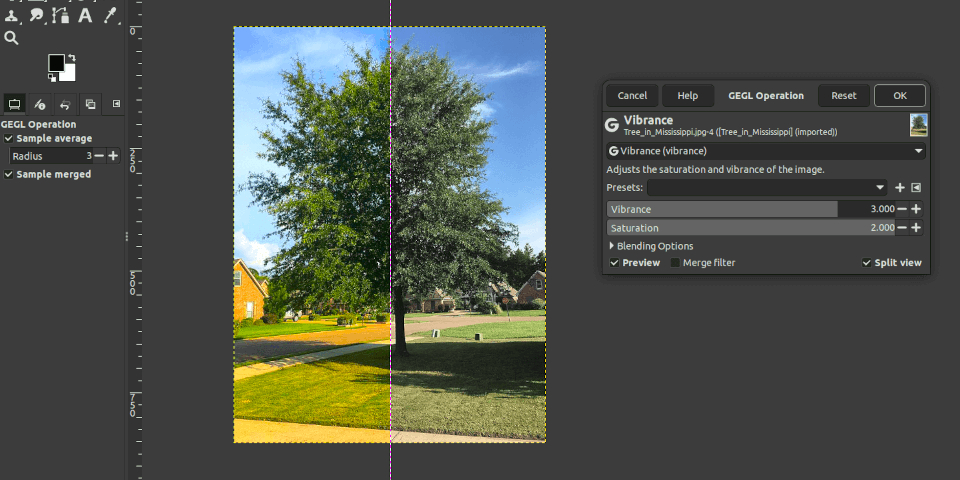
Apply filters and adjustments non-destructively to image channels
GIMP 3.2 builds on the system of non-destructive layer effects introduced in GIMP 3.0 last year.
As well as being able to add filters to layers and layer groups non-destructively – that is, to edit them after they have been applied – you can now add them to individual channels.
There is also a new Vibrance adjustment, along the lines of those in Photoshop and Affinity, for increasing the saturation of subtle colors in an image without oversaturating dominant ones.
New Link and Vector layer types
More significantly, GIMP 3.2 adds two new layer types, both editable non-destructively.
Link layers (above) function like linked Smart Objects in Photoshop, making it possible to link to an external image file – for example, a logo – as part of a GIMP composition.
Changes made to the external file are then automatically passed on to the GIMP.
Vector layers are just that: layers containing vector shapes.
When using GIMP’s Path tool, users now have the option to convert the path to a vector layer, rather than just creating a selection. The path and its stroke and fill settings remain editable.
Updates to digital painting
Changes to digital painting include a new Overwrite blend mode, which replaces the color values of underlying paint strokes without blending the alpha values, as shown above.
That makes it possible to create semi-transparent strokes through previously painted areas.
In addition, GIMP’s MyPaint Brush tool has been updated to MyPaint 2.0, the latest version of the open-source brush engine.
It now takes the rotation of the canvas into account, supports barrel rotation when painting with a stylus, and includes a new Gain slider to simulate stylus pressure when using a mouse.
Workflow improvements
The Text Editor gets a number of workflow improvements, including the option to drag the editor around on screen, and live previews when editing text colors.
Other workflow improvements include new keyboard shortcuts for common tools like Flip and Shear, and increased support for drag-and-drop workflows.
Better interoperability with Photoshop, Krita and Procreate
Changes to file import and export include the option to export Photoshop Large Document (PSB) files and JPEG 2000 files as well as import them.
Interoperability with Photoshop has been improved, with support for more layer styles in imported PSD files, and for importing Curves and Levels presets in .acv and .alv format.
It is also now possible to import Procreate palette swatches (.swatches) and to export Krita .kpl palette files.
The final 32-bit Windows build of GIMP
GIMP 3.2 will also be the final version of the software to get a 32-bit Windows build.
The final version of Windows itself to support 32-bit processors was Windows 10, which went out of support in October 2025.
License and system requirements
GIMP 3.2 is compatible with Windows 10+, macOS 11.0+ and Linux, including Debian 13+. Source code is available under a GPLv3 license.
The software is free, but if you want to support future development, or support its core developers, you can find details of how to do so on the Donate page on the GIMP website.
Read a full list of features in GIMP 3.2 in the online release notes
Have your say on this story by following CG Channel on Facebook, Instagram and X (formerly Twitter). As well as being able to comment on stories, followers of our social media accounts can see videos we don’t post on the site itself, including making-ofs for the latest VFX movies, animations, games cinematics and motion graphics projects.