
Pikimov 5 is a free alternative to After Effects and CapCut
Artist and developer Clément Cordier has released Pikimov 5, the latest version of his free browser-based video editing and motion design tool.
The update adds a new Classic editor to the existing 2D Motion Design and 3D Motion Design editors, which Cordier pitches as an alternative to CapCut as well as to After Effects.
Inspired by the success of Photopea
First released in 2024, Pikimov is a browser-based motion design and video editing tool.
Cordier describes it as being inspired by the success of Photopea, also created by a solo developer, which provides a browser-based alternative to Photoshop for simple image editing.
A free layer-based compositing tool with a UI and workflow similar to After Effects
The original version of Pikimov was mainly intended as an alternative to After Effects – as a Linux user, Cordier wanted a tool that he could use on a Linux machine.
Like After Effects, it uses a layer-based workflow for compositing, with support for masks, filters for image adjustments and blurs, and keyframing.
More advanced features include chroma keying for greenscreen removal, manual and automatic rotoscoping, and motion tracking.
The app ingests 2D images in a range of standard formats (JPG, PNG, WebP, AVIF, TGA, SVG), video in MP4, MOV and WebM format at up to 4K resolution, and 3D models in GLB format.
It’s also completely free to use, without the need to register on the website, and files are processed locally, without the need to upload data to a server.
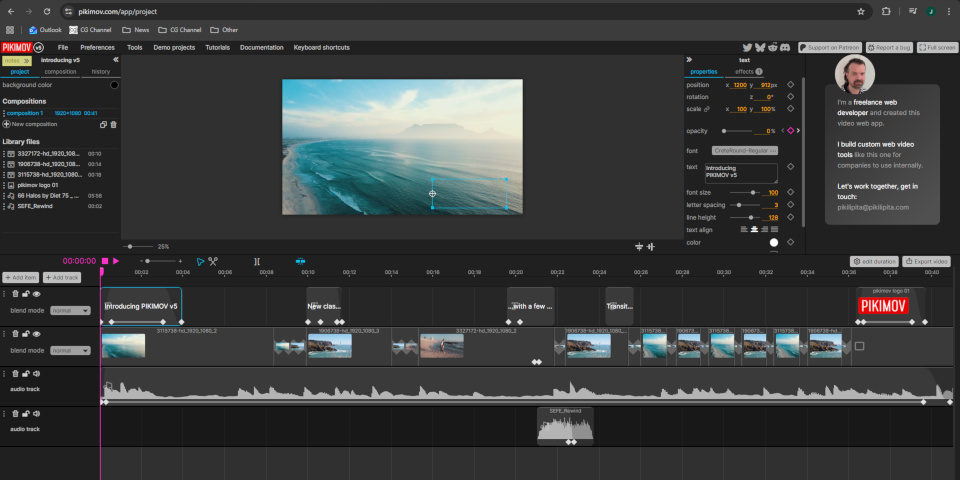
New Classic editor provides a browser-based alternative to CapCut
To that, Pikimov 5 adds a new Classic editor, which Cordier pitches as an alternative to CapCut for editing social media content.
Unlike 3D motion design, where there haven’t been many alternatives to After Effects since the demise of Autograph, video editing is a more crowded field.
Good existing free options include DaVinci Resolve, which is free for use on footage up to Ultra 4K resolution, and Blender’s Sequencer editor.
However, being browser-based, Pikimov is highly portable: you can use it on a client or collaborator’s machine without the need to install any software.
Price and system requirements
Pikimov runs in Chrome, Edge and Opera on Windows, Linux and macOS. It doesn’t support Firefox or Safari. It’s free to use, without the need to register or log in to the website.
If you like Pikimov and want to support development, you can back it on Patreon.
Try free browser-based motion design and video editing tool Pikimov
Read the online FAQs about Pikimov
Have your say on this story by following CG Channel on Facebook, Instagram and X (formerly Twitter). As well as being able to comment on stories, followers of our social media accounts can see videos we don’t post on the site itself, including making-ofs for the latest VFX movies, animations, games cinematics and motion graphics projects.